GD61x Indoor LoRaWAN Gateway Specification and User Guide
Document version: 1.8
Applicable models: GD61x series (GD614 and GD618 band variants)
1. Product overview
GD61x is an indoor LoRaWAN gateway based on the ESP32-S3, with a Semtech SX1301 or SX1302 concentrator according to the supplied configuration. Suffix -2 has a maximum transmit power of 22 dBm. It combines Ethernet, Wi-Fi and optional 4G backhaul and accepts Type-C or 5–24 V DC power. A 4G option code of G adds the 4G and PoE modules. A Web console provides network, LoRaWAN server, radio, logging and firmware-maintenance configuration.
PMC51x is a LoRa radio module for the GD6 series. See the PMC51x LoRa Module Specification for module specifications, the Mini-PCIe 52-pin definition, and SPI, PPS and reset interfaces. Check the delivered configuration for the fitted module variant.
The only external antenna is the LoRa antenna. The Wi-Fi antenna and, on configurations with 4G, the 4G antenna are installed inside the enclosure, making GD61x suitable for offices, buildings, campuses, equipment rooms and light-industrial indoor sites.
1.1 Product highlights
- ESP32-S3 controller with 8 MB Flash and 8 MB PSRAM.
- Semtech SX1301 or SX1302 concentrator according to the supplied configuration. Suffix
-2has a maximum transmit power of 22 dBm. ALoRa architecture: one LoRa antenna, 8 frequency points, 65 channels and half-duplex operation.- GD614 is the 400 MHz-class RF version; GD618 is the 800 MHz-and-above RF version. The model number does not indicate channel count.
- Ethernet and Wi-Fi STA backhaul; a 4G option code of
Gadds 4G and PoE. Ethernet is preferred by default, with automatic failover. - Wi-Fi Soft-AP for local configuration and recovery access.
- Semtech UDP Packet Forwarder, Basic Station and MQTT Bridge.
- DHCP, static IPv4, TLS certificates and a separate remote MQTT configuration channel; configurations with 4G support APN and SIM PIN settings.
- A/B OTA partitions, runtime logs, filesystem management and factory reset.
- External LoRa antenna; internal Wi-Fi antenna and internal 4G antenna when 4G is fitted.
- Type-C and 5–24 V DC input on all variants; PoE when the 4G option code is
G.
1.2 Technical specifications
| Category | Parameter | Specification |
|---|---|---|
| § Models and compute | ||
| Product family | GD61x | |
| Model-code format | GD61{4|8}-A{N|G}-{regional-standard}-{version-code}-2 | |
| Band variants | GD614 and GD618 | |
| 4G / PoE option | In -A{N|G}, N means no 4G or PoE; G means 4G and PoE are fitted | |
| Version code | N: default version; other values: customer-specific or special versions | |
| Controller | ESP32-S3 (ESP32-S3-WROOM-1 N8R8) | |
| Flash | 8 MB, QIO, 80 MHz | |
| PSRAM | 8 MB Octal PSRAM, 80 MHz | |
| Configuration storage | SPIFFS; settings persist through power loss | |
| § LoRaWAN | ||
| Concentrator | Semtech SX1301 or SX1302, as supplied | |
| LoRa architecture | A: one LoRa antenna, 8 frequency points, 65 channels, half-duplex | |
| Model and RF range | GD614: 400 MHz class; GD618: 800 MHz and above; the model number does not indicate channel count | |
| Channel bandwidth | Multi-SF channels default to 125 kHz; the LoRa Std channel is configurable | |
| Regional plans | GD614: CN470 and EU433; GD618: EU868, AS923, AU915 and US902; the ordered RF hardware and local regulations must match | |
| Uplink protocols | Semtech UDP Packet Forwarder, Basic Station and MQTT Bridge | |
| Basic Station | Direct LNS or CUPS bootstrap; TLS, token or client certificate | |
| Antenna | One external LoRa antenna connector; supplied omnidirectional antenna depends on configuration | |
| Transmit power | Suffix -2: 22 dBm maximum | |
| Receiver sensitivity | Determined by the ordered regional RF front end and antenna; no single value is declared in this guide | |
| § Network and backhaul | ||
| Ethernet | W5500, 10/100 Mbps, RJ45 | |
| Ethernet addressing | DHCP or static IPv4 with gateway and primary/secondary DNS | |
| Wi-Fi | ESP32-S3 integrated 2.4 GHz Wi-Fi, AP + STA | |
| Default Wi-Fi AP | SSID: GD6-<Gateway EUI>; falls back to LGW-Config only when no valid Gateway EUI is available; password: wifi!0804; management address: 192.168.4.1 | |
| 4G option | Fitted when the 4G option code is G; omitted when it is N | |
| 4G interface | miniPCIe on configurations with 4G; the modem can be replaced for different operator bands | |
| Default 4G class | LTE Cat 1 on configurations with 4G; default modem bands match GDI51 | |
| LTE-FDD bands | Default modem with 4G: B1 / B3 / B5 / B8 | |
| LTE-TDD bands | Default modem with 4G: B34 / B38 / B39 / B40 / B41 | |
| SIM | External SIM slot on configurations with 4G | |
| Link selection | Automatic Ethernet/Wi-Fi STA failover; configurations with 4G add cellular backhaul; Ethernet is preferred by default | |
| § Interfaces | ||
| LoRa | External antenna connector | |
| SIM | Front SIM slot for configurations with 4G | |
| REC (Recovery) | Factory-reset button | |
| Type-C | 5 V power and local maintenance | |
| RJ45 | Ethernet data on all variants; PoE when the 4G option code is G | |
| Terminal block | 5–24V, G, A+, B- | |
| RS-485 | A+ and B- are reserved and have no user function in the current release | |
| § Power | ||
| Type-C | 5 V DC | |
| DC terminal | 5–24 V DC | |
| PoE | Fitted when the 4G option code is G; use PoE equipment matched to the delivered hardware | |
| Multiple power inputs | Do not connect more than one input unless project-specific delivery documents explicitly allow it | |
| § Software and maintenance | ||
| Management | Chinese/English Web console, REST API and separate remote MQTT configuration channel | |
| Network time | SNTP with multiple-source retry | |
| Firmware update | Web OTA with A/B application partitions | |
| Logs | Live logs, level/component filters, pause, clear and download | |
| User security | Password login, token authentication and first-login password-change reminder | |
| Factory reset | Restores network and gateway settings and resets the login password; preserves the programmed Gateway EUI | |
| § Enclosure and installation | ||
| Environment | Indoor | |
| Operating temperature | -25°C to 60°C (all GD6-series gateways) | |
| Mounting | Desktop or wall mounting with the rotating bottom bracket | |
| External antenna | LoRa only | |
| Internal antennas | Wi-Fi and, when fitted, 4G | |
| Dimensions, weight and ingress rating | Not declared in this revision; use the order or delivery specification for project selection |
2. Before you begin
This guide covers GD61x model identification, interfaces, installation, power-up and hardware precautions. GD614 and GD618 use the same gwTool6 configuration system; see the gwTool6 Configuration Guide for Web login, network backhaul, LoRaWAN server, radio and system-maintenance tasks. The 4/8 distinction identifies the LoRa RF range, not the channel count: GD614 is the 400 MHz-class version, while GD618 is the 800 MHz-and-above version.
Prepare the following:
- A LoRa antenna matching the ordered RF band.
- Type-C 5 V or 5–24 V DC terminal power; a 4G option code of
Gcan also use compatible PoE. - Ethernet or a Wi-Fi network; an activated SIM is also required when the 4G option code is
Gand 4G backhaul is used. - A computer or phone able to reach the gateway's local address.
Important
Attach the LoRa antenna before applying power. Do not connect multiple power sources at once, do not apply power to the reserved A+/B- pins, and do not remove power during OTA or factory reset.
3. Identify the model and device
3.1 Identify the complete model code
3.1.1 Model example
GD618-AG-AS923-N-2
3.1.2 Model component breakdown
GD618: product series and RF band.GD61identifies a sixth-generation indoor LoRaWAN gateway.8identifies the 800 MHz-and-above RF version for EU868, AS923, AU915 and US902.- Other band option:
4identifies the 400 MHz RF version for EU433 and CN470.
-AG: LoRa architecture and 4G / PoE configuration.Aidentifies one LoRa antenna, 8 frequency points, 65 channels and half-duplex operation.Gidentifies a configuration with both 4G and PoE modules.- Other 4G / PoE option:
Nidentifies a configuration without 4G or PoE modules.
-AS923: LoRaWAN regional standard.AS923means that the gateway supports the LoRaWAN AS923 regional parameters.- Other regional codes are
CN470,EU433,EU868,AU915andUS902;US902denotes the LoRaWAN US915 (902–928 MHz) regional parameters. - The regional code must match the RF version, antenna and local regulations.
-N: default version.Nidentifies the default version.- Other values identify customer-specific or special versions.
-2: transmit-power version.2identifies a maximum transmit power of 22 dBm.
3.1.3 Complete model meaning
The complete meaning of GD618-AG-AS923-N-2 is:
This is a sixth-generation indoor LoRaWAN gateway using the 800 MHz-and-above RF version for AS923, with one LoRa antenna, 8 frequency points, 65 channels and half-duplex operation. It includes the 4G and PoE modules, uses the LoRaWAN AS923 regional parameters, identifies the default version with N, and has a maximum transmit power of 22 dBm.
3.2 Interfaces
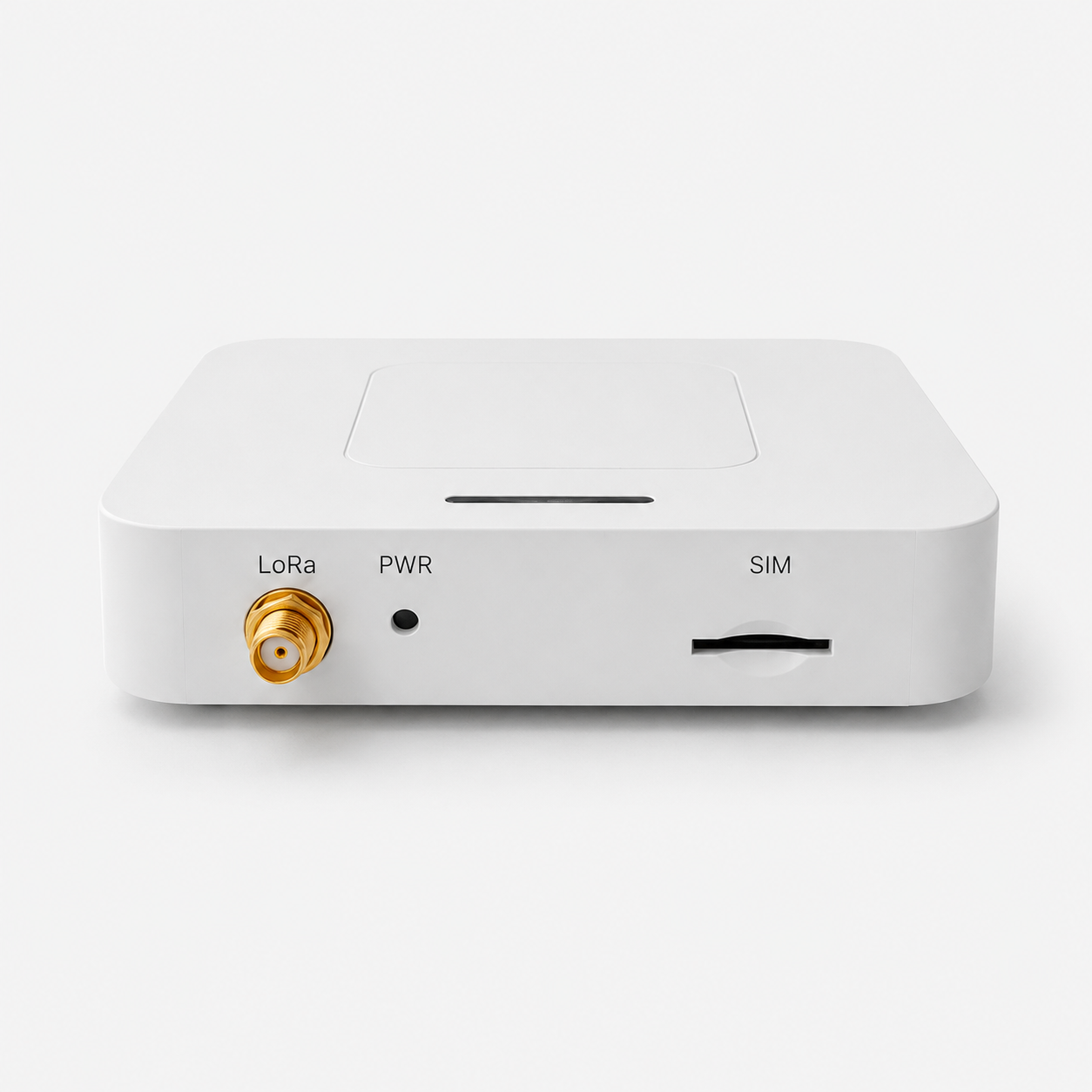
The front panel contains the LoRa connector, REC (Recovery) factory-reset button and SIM slot. Only LoRa uses an external antenna. The Wi-Fi antenna and the 4G antenna on G configurations are internal.
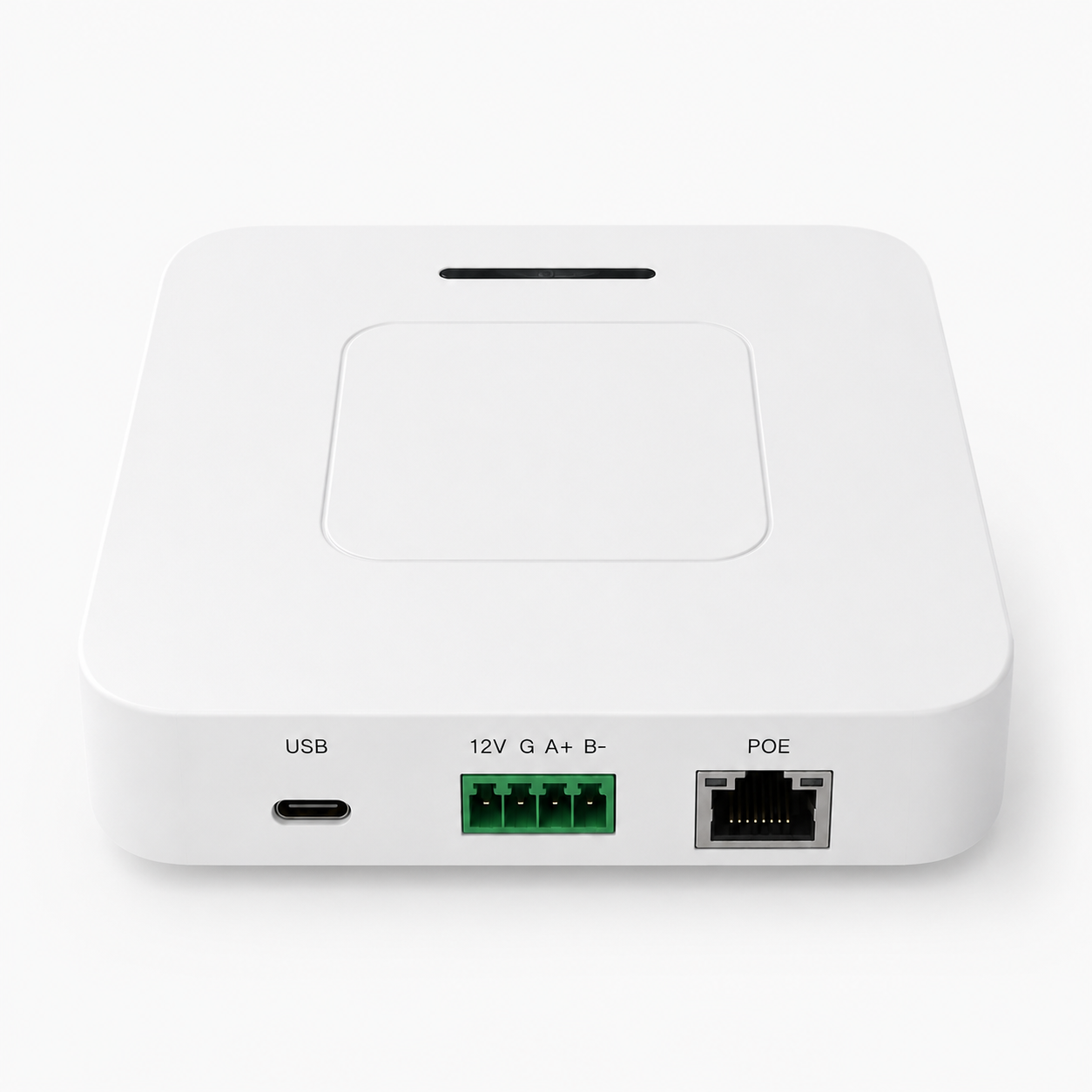
| Interface | Purpose |
|---|---|
| USB | Type-C 5 V input and local servicing |
| 5–24V / G | Positive wide-range DC input / ground |
| A+ / B- | Reserved RS-485 pins; no operational device should be connected in this release |
| POE | 10/100 Mbps Ethernet on all configurations; PoE input only on G configurations |
The rotating bottom bracket supports wall mounting. Keep the bottom ventilation openings clear.
4. Installation and power-up
4.1 Attach the LoRa antenna
- Verify that the antenna band matches the gateway RF version.
- Hand-tighten the antenna on the
LoRaconnector without side-loading it. - Never start LoRa transmission with the antenna disconnected.
4.2 Install a SIM
This section applies only to G configurations. For 4G backhaul, power the gateway off and insert an activated SIM in the SIM slot. A SIM without a PIN can dial directly. If PIN protection is enabled, enter its 4–8 digit PIN in the Web console.
4.3 Select one power method
Use exactly one of these methods:
- Type-C: connect a stable 5 V supply.
- DC terminal: connect the positive lead of a 5–24 V DC supply to
5–24Vand negative toG. - PoE (
Gconfigurations only): connect a compatible powered Ethernet cable toPOE.
After power-up, the LED slow-blinks continuously (1 s on / 1 s off by default). System initialization, IP acquisition and LoRa service startup take some time.
5. Configure the gwTool6 system
GD61x uses the shared gwTool6 configuration system. The following tasks are maintained in the gwTool6 Configuration Guide:
- Web-console access and sign-in.
- Ethernet, Wi-Fi and optional 4G backhaul.
- Semtech UDP, MQTT Bridge and Basic Station.
- LoRaWAN region, sub-band and channel settings.
- Logs, firmware, filesystem, users and remote configuration.
- Post-reset configuration state and common troubleshooting.
For initial setup, find the gateway in the Ethernet DHCP lease table, or join GD6-<Gateway EUI> and open http://192.168.4.1. The SSID falls back to LGW-Config only when the device has no valid Gateway EUI. The default AP password and default Web password are both wifi!0804; they can be changed separately. After saving a static Ethernet address, confirm a backup management path and restart the gateway before reconnecting at the new address.
For ChirpStack or TTN, follow the gwTool6-specific links under Related documents. Basic Station and Packet Forwarder are mutually exclusive, so changing drivers briefly interrupts LoRa forwarding. While Basic Station is active, the LNS-supplied router configuration controls the channels; local Radio settings are retained for a later switch back to Packet Forwarder.
The ordering code and technical specifications in this guide remain authoritative for the hardware capabilities of a particular GD61x unit.
6. REC (Recovery) button and factory reset
REC has one function only: factory reset. It does not enable the Wi-Fi AP or perform any other operation. Hold REC; the gateway follows this sequence: solid at the 2 s threshold → reset runs → three fast flashes → reboot.
Factory reset restores network, LoRaWAN, MQTT, remote settings and, on G configurations, 4G settings. It changes the login password back to wifi!0804, preserves the programmed Gateway EUI and does not overwrite the Web static files.
7. Indicator patterns
| ID | Pattern | Meaning |
|---|---|---|
| FR6 | LED slow-blinks continuously (1 s on / 1 s off by default) | Normal operation |
| FR7 | Factory reset: solid at the 2 s threshold → reset runs → three fast flashes → reboot | Factory reset |
8. Troubleshooting
| Symptom | Checks and recovery |
|---|---|
LGW-Config cannot be found | Look for GD6-<Gateway EUI>, derived from the programmed Gateway EUI; LGW-Config is used only when no valid EUI is available |
| A saved static Ethernet address is not active | Confirm a backup management path, restart the gateway, then reconnect at the new address |
4G on a G configuration will not register | Check SIM, PIN, APN, signal and modem bands; verify internal antenna and miniPCIe modem installation |
| No LoRa uplink | Check antenna, regional band, Gateway EUI, LNS address/ports and active backhaul |
| Gateway does not return after OTA | Allow the automatic reboot to finish; if still unavailable, recover through the Wi-Fi AP or a controlled serial service procedure instead of repeated power cuts |
| Web, login, Ethernet or Wi-Fi configuration problem | Follow Configuration troubleshooting in the gwTool6 Configuration Guide |
9. Related documents
- PMC51x LoRa Module Specification
- gwTool6 Configuration Guide
- Connect to ChirpStack with Basic Station (gwTool6)
- Connect to TTN with Basic Station (gwTool6)
- LoRaWAN Gateway documentation index