AN-26102101 16-Channel Gateway Best Practices: Dual PMC and Dual NS
Version 1.1 · 2026-10-21
Applies to: 16-channel gateways equipped with two SX1302 / PMC modules and managed through gwTool7. Single-PMC, 8-channel models are outside this scope.
Related: gwTool7 Administrator Guide · 中文
For a standard deployment, start with two different groups of eight frequencies, one NS and one gateway EUI. Use two EUIs when the platform needs to identify each PMC separately. Configure a separate NS for the second path when two independent networks share the gateway.
Two menus must be used together: Radio determines which frequencies each PMC receives; LoRaWAN NS determines the gateway identity and destination NS for each path. Configure and save both menus, then verify data reception from both paths.
1. Define the two paths
| Configuration location | First path | Second path | Purpose |
|---|---|---|---|
| Radio | RF1, channels 1–8 | RF2, channels 9–16 | Eight receive frequencies per PMC |
| LoRaWAN NS | NS1 primary server | NS2 backup | Reuse the primary identity/server, or configure a separate EUI and NS |
| NS / AS platform | Register the expected EUI; configure devices and channel plan | Register the second EUI or configure the second NS as required | Authentication, downlink scheduling and application delivery |
RF1 / RF2 here refer to the two PMC configuration groups shown by gwTool7. The single-channel bandwidth, frequency and spreading-factor fields inside each group configure its separate single channel. That frequency field is not a common center-frequency setting for all eight channels below it.
The NS2 backup tab configures the identity and server connection for the second path. Both paths can operate simultaneously in dual-PMC mode. NMS is the gateway management server, not a second LoRaWAN NS.
2. Choose a deployment scenario
| Scenario | RF1 and RF2 | Gateway identity | NS arrangement | Main acceptance criterion |
|---|---|---|---|---|
| A: Default 16-frequency expansion; recommended starting point | Two non-overlapping groups of eight | One EUI | Both paths use NS1 | Both groups deliver uplinks, downlinks and AS data |
| B: Identify each PMC on one platform | Two non-overlapping groups of eight | Two different EUIs | Same NS | Each EUI maps to the expected frequency group |
| C: Two independent networks on one gateway | Two non-overlapping groups of eight | Two different EUIs | Separate NS1 and NS2 | Each device group reaches its designated NS / AS |
| D: Same-frequency reception comparison | Same eight frequencies in both groups | Two different EUIs | Same NS | Observe both paths; check NS deduplication and downlink selection |
| E: Same-frequency comparison across platforms | Same eight frequencies in both groups | Two different EUIs | Two separate NSs | Use unconfirmed uplinks; verify matching data at both ASs |
If both PMCs use the same eight frequencies, the gateway covers eight distinct frequencies, not sixteen distinct frequencies. Sixteen different frequencies do not guarantee twice the device capacity or throughput: device channel use, reporting intervals, airtime and downlink load also matter.
3. Prepare before changing configuration
- Confirm that two PMC modules are installed and Radio shows RF2 · Second radio chain, marked PMC2 models only. Entering extra fields cannot upgrade single-PMC hardware.
- Back up NS1, NS2, both EUIs, all frequencies and single-channel settings. Schedule changes for a window that permits gateway services to restart.
- Record each target NS, protocol, address, ports or MQTT credentials. Register the intended gateway identities at the corresponding NS. Allocate a unique second EUI; do not copy another active gateway's EUI.
- Prepare two controllable devices, one using each frequency group. Configure their identities, regional parameters and matching channel plans in the NS.
- Arrange access to NS reception records, AS application data and device ACK results. Use the gateway Traffic page as an additional observation point.
4. Configure Radio first
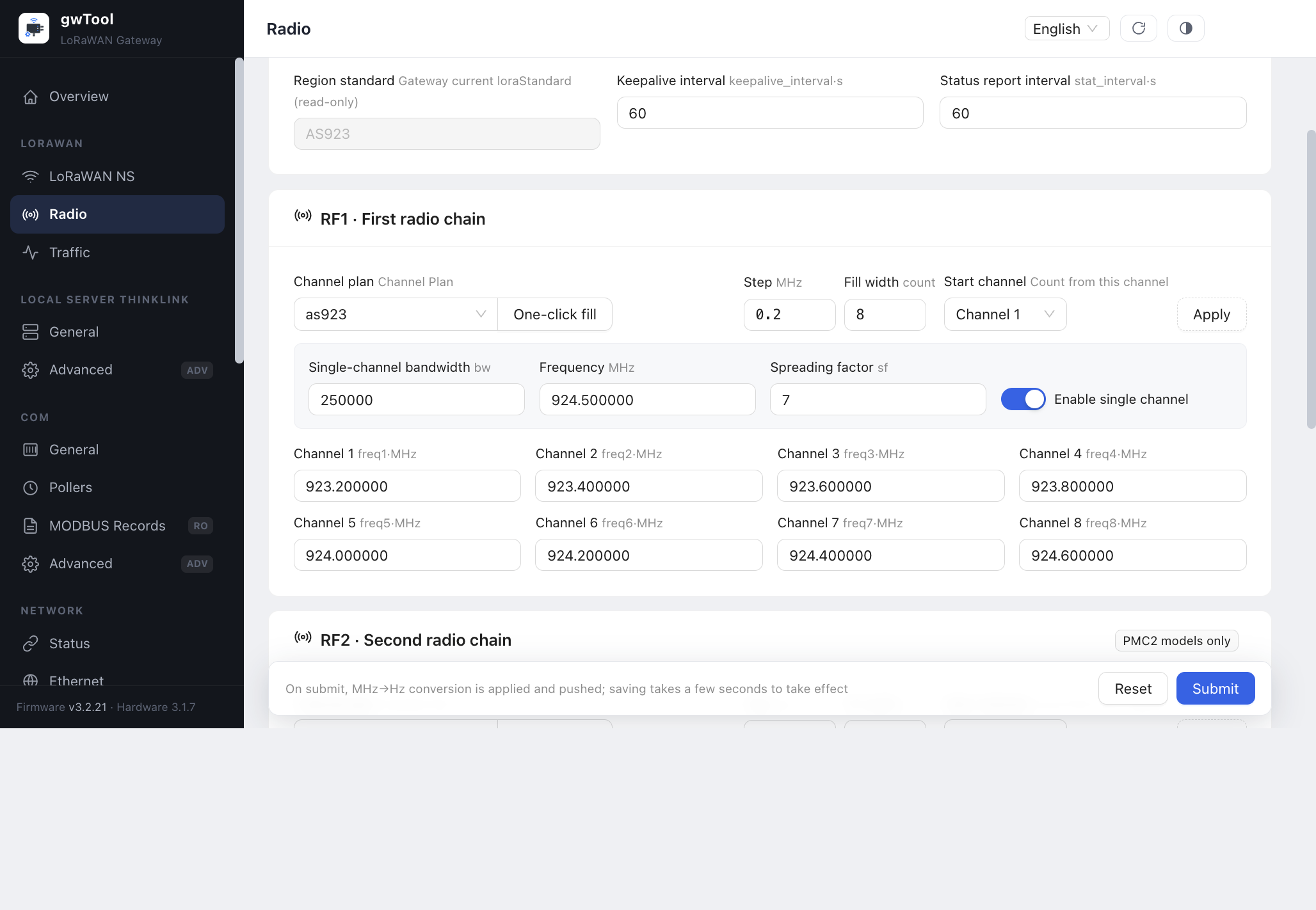
Open LORAWAN → Radio. The Region standard field reports the gateway's current loraStandard and is read-only. The editable Channel plan selectors are inside the RF1 and RF2 cards.
4.1 RF1: channels 1–8
- Select a channel plan matching the gateway region and network design. Use One-click fill, then inspect all eight resulting frequencies.
- For regularly spaced channels, set the starting channel frequency, then verify Step MHz, Fill width and Start channel. For one group of eight, use width 8 and start at channel 1, then choose Apply.
- Check the separate single-channel settings; do not confuse its frequency with the eight channel-frequency fields below it.
4.2 RF2: channels 9–16
- Configure the second group in RF2. When using sequential fill, verify start channel 9 and width 8.
- For A/B/C, use frequencies different from RF1. Inspect all sixteen values even when both cards show the same plan name.
- For D/E, map RF1's eight frequencies in order to channels 9–16 and verify the other radio conditions required for the comparison.
- Choose Submit at the bottom of the page. One-click fill and Apply populate the form; they do not replace the final submission. Wait for the settings to take effect, reopen the page and verify both groups.
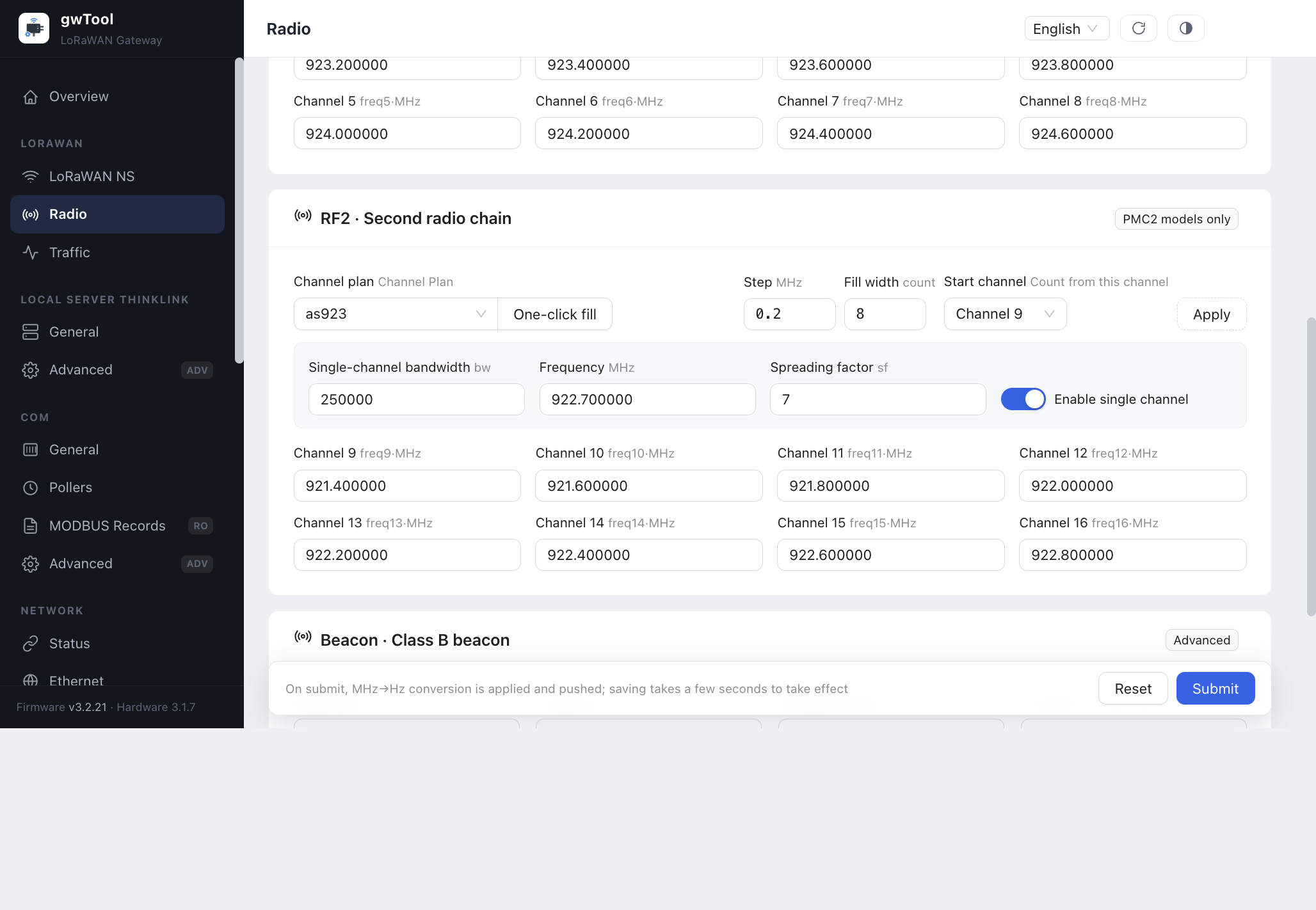
Radio channel frequencies use MHz; Beacon frequencies use Hz where indicated. Use the frequencies specified by the deployment region and NS channel plan.
4.3 Check the frequency plan
Before saving, check both groups against the selected scenario:
| Check | 16-channel expansion (A/B/C) | Same-frequency reception (D/E) |
|---|---|---|
| RF1 | Configure the first eight frequencies | Configure the eight frequencies to receive |
| RF2 | Configure eight different frequencies without overlap with RF1 | Enter the same eight frequencies as RF1 in matching order |
| Distinct frequencies | Sixteen | Eight |
| Devices and NS | Devices use the corresponding group; the NS channel plan matches the gateway | Both paths cover the target devices' frequencies |
5. Configure LoRaWAN NS
Open LORAWAN → LoRaWAN NS. Configure NS1 first, then NS2 for the chosen scenario. Select Save & restart, wait for services to recover, then Reload the settings. NS and Radio save independently; saving NS does not submit Radio settings.
5.1 Scenario A: one NS and one EUI
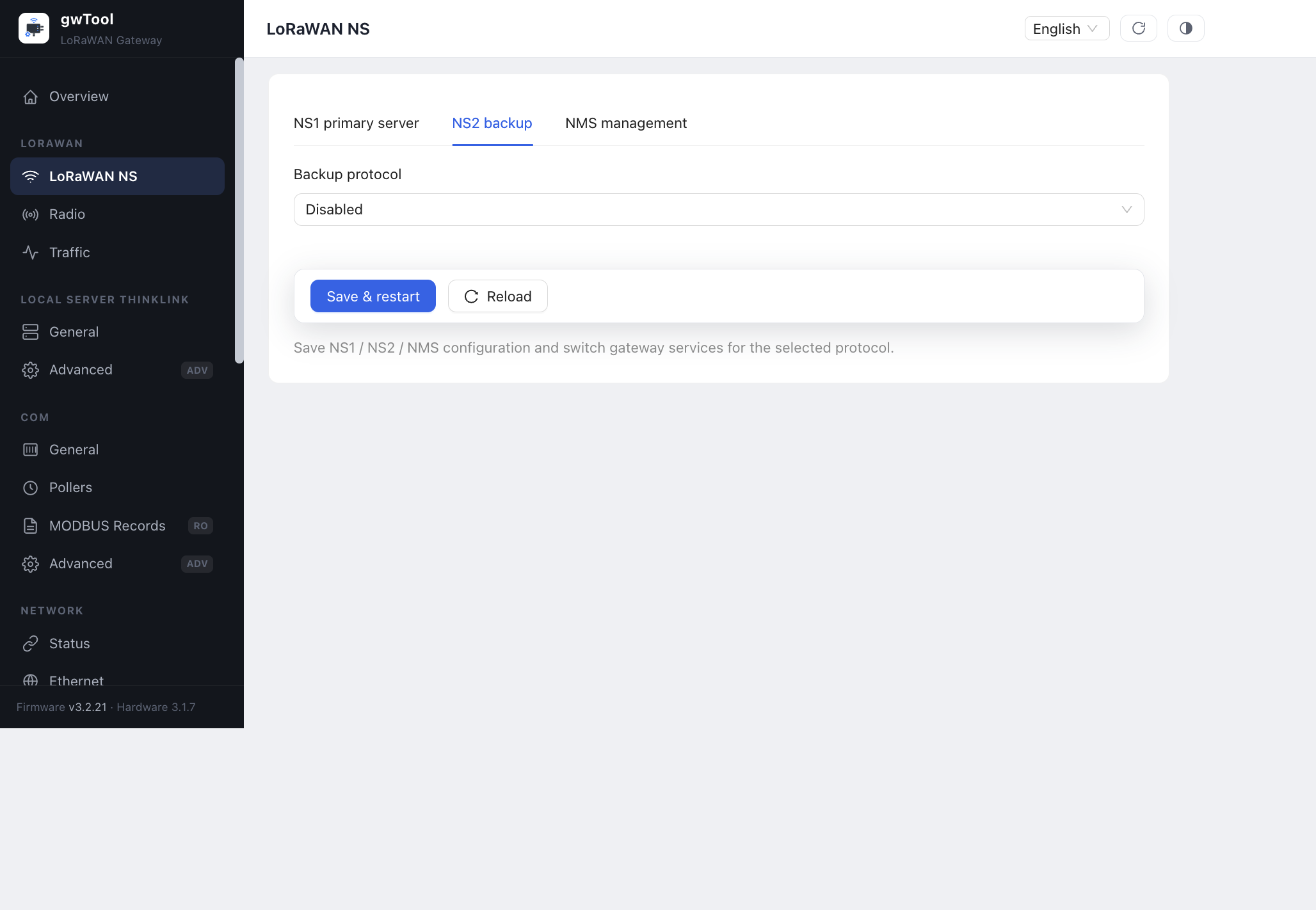
Configure the target NS in NS1. In NS2, set Backup protocol to Disabled. After saving, the second path reuses the primary identity and NS configuration. This disables an independent NS2 configuration; it does not turn off RF2.
5.2 Scenarios B/D: one NS and two EUIs
- Keep the primary server configuration in NS1.
- In NS2, select the same ThinkLink MQTT or Semtech UDP (GWMP) protocol as the primary path.
- Enter the second Gateway EUI: 16 hexadecimal characters, different from the first EUI.
- Explicitly enter parameters that connect to the same NS. For UDP, match the address and uplink/downlink ports. For MQTT, verify the Broker address and credentials authorized for this path. Entering an EUI alone does not copy the other visible fields from NS1.
- Save, reload and verify reception under both EUIs in the same NS.
Two EUIs on the same NS
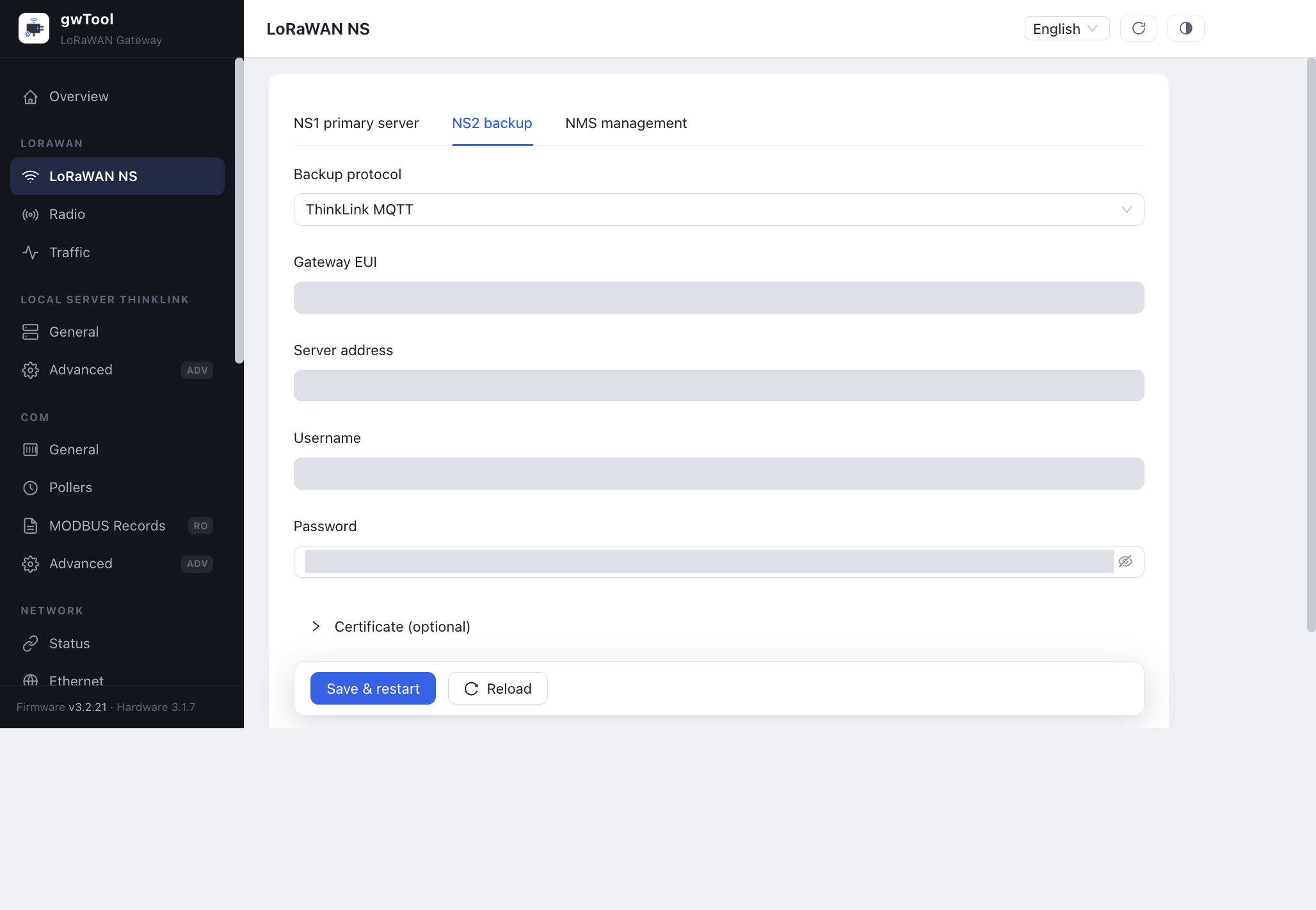
Select a protocol in NS2 and enter the second EUI, server address and connection parameters. Saving Disabled clears the second EUI and reuses NS1's identity and configuration. When NS1's address or authentication changes, update NS2 to keep both paths connected to the same NS.
5.3 Scenarios C/E: two NSs and two EUIs
Configure the first NS in NS1. Give NS2 a second EUI and the protocol and connection parameters of the second NS. Register the second EUI and configure the relevant devices on that NS.
Each path can use ThinkLink MQTT or Semtech UDP (GWMP) with the connection parameters supplied by its target platform.
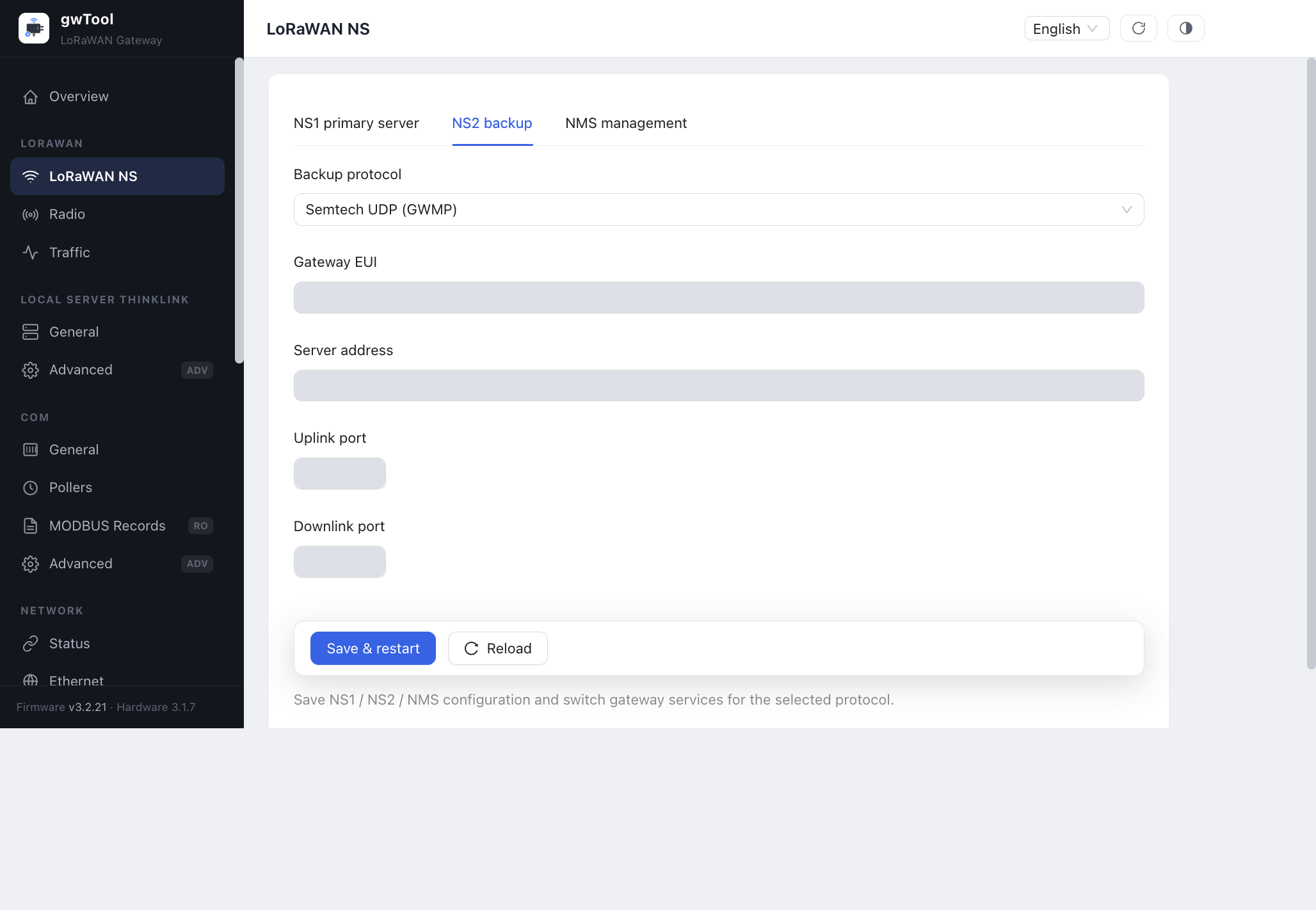
NS2 offers Disabled, ThinkLink MQTT and Semtech UDP (GWMP). To configure the second path independently, select its protocol and enter the connection parameters.
6. Downlink ownership with two NSs on the same frequencies
In scenario E, the same radio packet can reach both NSs. Send Unconfirmed Uplink frames to check data delivery at both ASs. Do not let both NSs schedule ACKs, Join-Accepts or other downlinks for the same device; this creates conflicting receive-window and session behavior.
Designate one server to control joining and downlinks. Use the other for uplink observation and control its downlink behavior using the platform's supported settings. An unconfirmed uplink does not request an ACK for that frame; it does not disable all downlinks. Device identities, keys, sessions and frame counters must match the deployment configuration. Copying a gateway EUI alone does not make the same device payload decryptable at two ASs. If the business requirement is simply two applications receiving the same data, first consider application distribution after a single NS.
7. Verify three layers
7.1 Configuration readback
- Radio: both eight-frequency groups match the plan; expansion mode covers sixteen distinct frequencies.
- NS: protocol, second-EUI presence, destination and ports match the scenario.
- Platform: registered identities match the design. A single gateway identity is expected in scenario A.
7.2 Radio operation and application delivery
| Check | Action | Pass condition |
|---|---|---|
| First group | Restrict device A to the first group and send uplinks | Gateway / NS identifies the expected frequencies and the target AS receives data |
| Second group | Restrict device B to the second group and send uplinks | Actual uplinks arrive through the second group; A alone does not prove both paths |
| Confirmed uplink/downlink | Test each group where one server owns the expected downlink | Device receives its ACK and the corresponding AS receives data |
| Separate NS routing | Trigger devices in each group | Frequency, EUI and target NS / AS match the design |
| Same-frequency dual NS | Send unconfirmed uplinks and correlate device, frame counter and time | Both ASs contain matching records; designated downlink ownership is maintained |
| All frequencies | Use controlled device channel selection to test each frequency | Retain reception evidence for all sixteen; one uplink is not full coverage |
7.3 Recovery and records
Keep the configuration plan, software version, per-group uplinks, ACK results and AS records. If power-cycle persistence is required, restart during a maintenance window, read settings again and repeat both device tests. If problems occur, restore the original configuration in both menus and retest the previous service. Screenshots, a successful save and an online service do not replace radio and AS acceptance.
8. Troubleshooting
| Symptom | Check first |
|---|---|
| RF2 is absent | Dual-PMC hardware, hardware detection and matching firmware; do not force second-group settings into an 8-channel model |
| Both paths report, but only eight distinct frequencies are used | Whether RF2 duplicates RF1 and same-frequency comparison was mistaken for expansion |
| NS shows only one gateway identity | Whether scenario A was intended; otherwise check whether NS2 was saved as Disabled |
| First group works; second group is silent | Device B's actual frequencies, RF2 readback, second-EUI registration and NS2 protocol/endpoint |
| Gateway receives packets but AS has no data | Target NS, device identity, keys, session and application forwarding |
| Uplinks work but confirmed traffic fails | Downlink parameters, receive windows and scheduling ownership; use the unconfirmed procedure for same-frequency dual-NS comparison |
| Second path still connects to an old endpoint | Explicit NS2 parameters in B/D must be maintained alongside NS1 |