System Upgrade
System Platform → System Upgrade is used to upgrade ThinkLink itself (not gateways, not firmware).
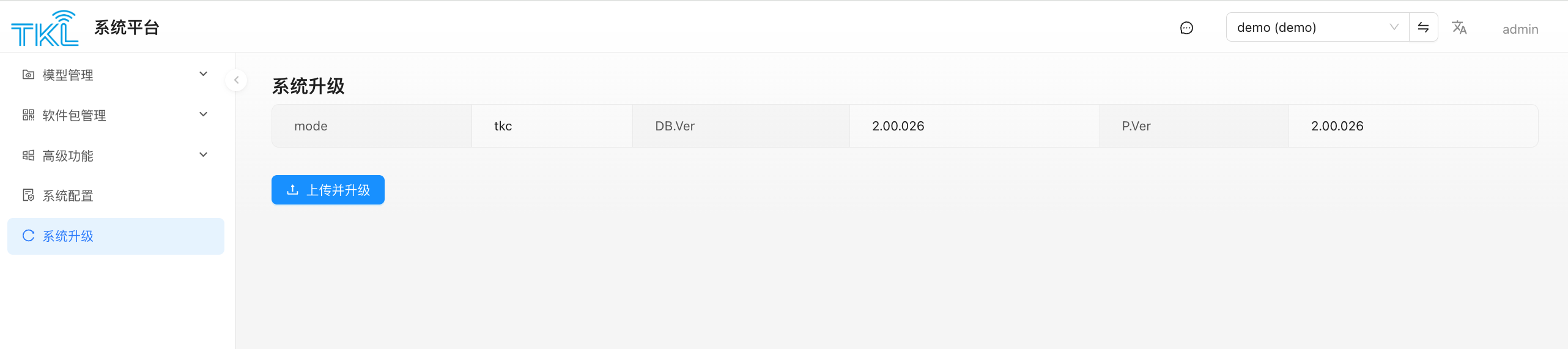
The top of the page shows the current core version info of this deployment:
| Field | Meaning |
|---|---|
| mode | Deployment form: gw (TKG, gateway edition) / tke (standalone edition) / tkc (Docker container deployment) |
| DB.Ver | Current database schema version |
| P.Ver | Current program version |
Key Point: TKG and TKE Upgrade Packages Are Not Interchangeable
The backend validates the uploaded file's name prefix based on the current mode. The wrong type of package is rejected outright:
| Current mode | Accepted filename prefix | Example |
|---|---|---|
gw | starts with tkg | tkg-2.00.020.tar.gz |
tke or tkc | starts with tke | tke-2.00.020.tar.gz |
Don't mix them up
- TKG packages (
tkg-*.tar.gz) can only be uploaded to amode=gw(gateway-edition) deployment. - TKE packages (
tke-*.tar.gz) can be uploaded to eithermode=tkeormode=tkc— the standalone-edition and the Docker container share the same upgrade package. - Uploading a wrong-prefixed package fails immediately with "The upgrade package name is invalid".
Upgrade Flow
- Back up the database (strongly recommended).
- Prepare a
.tar.gzupgrade package that matches the current mode. - Click
Upload and Upgradeon the page and pick the file. - The backend automatically:
- extracts the uploaded
.tar.gzinto the upgrade directory; - verifies the extracted content contains
tkl_upgrade.sh, otherwise aborts; - runs
tkl_upgrade.shto perform the main upgrade; - if
tkl_post_upgrade.shexists, runs it to clean up (delete the upload, clear the upgrade dir).
- extracts the uploaded
- During the upgrade the ThinkLink service may restart and the page is briefly unavailable. Once it comes back, refresh and confirm that
P.Ver/DB.Verreflect the new versions.
Risk Notes
- Always back up the database before upgrading, and have a rollback plan.
- Don't cut power or kill the process during the upgrade.
- For a remotely-deployed TKG, make sure you have an SSH fallback channel in case the web service fails to come back up.
- Schema changes between major versions are not reversible; read the release notes when skipping multiple versions.
Difference from "Gateway Upgrade Package"
| System Upgrade (this page) | Gateway Upgrade Package | |
|---|---|---|
| Who is upgraded | ThinkLink itself (TKG/TKE/TKC) | Firmware of managed gateway devices |
| Who triggers | The admin uploads directly in the System Platform | The admin uploads to the system, tenants dispatch from their own "Gateway Management" page |
Upgrade Notes for 2.00.084–2.00.085
Baseline: backend 2.00.083 72f15f5 → 2.00.084 ee0a198 → 2.00.085 ec61d78; matching frontend 6050602 → 0a62364 → da5e848. Identify the frontend by commit, not an assumed matching version number. This is a source and documentation contract update: deployment, target database migration, and real-device acceptance have not been completed.
| Feature | Usage after upgrade |
|---|---|
| Device status notifications | Device/template switch defaults to disabled. Set the actual heartbeat; timeout is strictly beyond twice that value. Historical messages use reception time; disabling retains the last state |
| MQTT status events | Changes are not alarms. API online, attribute _online, and MQTT data.online remain distinct |
| BACnet attribute sources | Free source strings, attribute paths, and source-aware uniqueness; distinguish object units from model unit. Defaults do not prove detected status |
| RPC search and remarks | Search names/identifiers, or the ID displayed when the identifier is absent. Several lists display two remark lines with full text on hover; stored content is unchanged |
Program and Database Migration
- Back up the program, database, and service settings using the established release process. Build with the matching lockfile. 084 adds
@stevenleep/timewheel; includework-thread/device-status/index.jsand migration SQL in production artifacts. - From 083 to 085, run 084 then 085 migrations; from 084, run 085. Older versions also require intermediate migrations. A changed program version or a working page does not prove database upgrade success.
sql/ver-2.00.084/system-01-device-status.sqladdsnotify_offline, default"FALSE", to the system-level device and device-template tables.- 085 contains
sql/ver-2.00.085/system-01-version.sqlandsql/ver-2.00.085/tenant-01-bacnet-data-source.sql. The latter adds tenantbacnet_object.data_from, defaulttelemetry_data, and changes uniqueness to(eui, data_from, thing_model, field_name). - The 085 tenant SQL uses unqualified
"bacnet_object"and depends on the upgrader settingsearch_pathper tenant. Do not run it under an arbitrary connection's default schema or replace nonexistent schema placeholders. - Check program/database versions, each tenant's columns/indexes, Worker startup, BACnet service and point synchronization, and frontend save/readback. Upgrade does not automatically enable detection or create status objects for every device.
Compatibility and Target Acceptance
- Check new/old devices and templates, old Excel missing-column preservation, disabled defaults, and template inheritance. Template reset preserves activity time and recalculates; partial updates preserve unread fields.
- Test online, timeout, recovery, duplicate suppression, disable/re-enable, historical messages, Worker recovery, and identical EUIs in separate tenants. Check missing heartbeats and exact-deadline differences among status sources.
- Check old telemetry objects, attribute paths, same field names from different sources, unknown-source defaults, and 0/false. Verify the correct tenant receives
_onlinechanges. Distinguish Input write rejection from Output/Value RPC success, failure, and device feedback. - Validate switches, source entry, RPC search, and remark expansion in the browser. Report documentation/contracts updated, deployed, and integration passed as separate states.
Upstream records report: 084 type checks, targeted tests, and independent Worker packaging/runtime passed, but its full suite had 384 passes, 36 failures, and 4 skips out of 424. The final 085 record reports 102 targeted tests and type checks passed, including local UDP/COV/Worker coverage; migration tests used simulated tenants. The frontend still had 91 baseline type errors, reportedly without new diagnostics. These are upstream records; this documentation task did not rerun backend/frontend checks. They do not establish that full-suite failures were resolved or that real migration, MQTT/Modbus/BACnet device integration, frontend browser interactions, or a complete production build passed.
2.00.080–2.00.083 upgrade notes
This section consolidates recent changes against tkl-main 2.00.083 and its matching tkl-web. Confirm deployed frontend/backend versions, database migrations and endpoint capabilities before enabling features.
| Feature | Updated workflow |
|---|---|
| File Management | Resource Management → File Management; 50 MiB per ordinary file and per organization total. Replacement preserves identity and links; disabling sharing invalidates old public links. |
| Micro Applications | Resource Management → Micro App, permission 1401; 10 applications, 20 MiB each. Preserve IDs, configuration and business permissions; verify old role migration. |
| Device editing | Load groups as needed and save differences. The new 3D tab accepts an object or null; re-read after saving. |
| Location details | Separate current location from current plus descendants; use minimal fields and complete pagination for summaries. |
| BACnet | Save parameters, then restart. Point changes synchronize automatically; check runtime state and synchronization errors. One organization instance per backend process. |
| Organization service permissions | SYSADMIN can disable Modbus/BACnet, stopping services and hiding entries while preserving configuration and points. Organizations must start manually after re-enabling. |
Administrator and operations checks
- Back up and execute required migrations through the upgrader. Check external views, reports and direct SQL. Six device data groups have moved to device_data. The 2.00.082 3D device column was transitional; 2.00.083 stores it in device_data. Do not skip required migrations.
- Check resource permissions (parent 1400, micro applications 1401, files 1402), quotas, refreshed replacement content, sharing disabled and ticket expiry.
- Verify 3D objects, null, empty objects, concurrent-save readback, location scope, full pagination and organization isolation. A successful save does not prove runtime activation, completed persistence or physical device execution.
- System LoRaWAN gateway profiles require SYSADMIN. Release sets RELEASE and disables the profile; it is not physical deletion. Check
pgResultandtkoResultseparately: database success does not prove ThinkOne synchronization. Pass bigint values as decimal strings. Omitting tenant during a save may release ownership rather than preserve it. - Tenant deletion errors may occur after business data deletion, during LoRaWAN release or runtime cleanup. Inspect each stage before deciding what to do; do not automatically recreate the tenant or assume nothing ran. Include files and BACnet instances in verification.
PG_WORKERis a temporary maintenance patch for listed gateways. It can clean logs, repair PostgreSQL parameters and restart pgsqlDB. Incremental migration includes a historical list; new installations start empty. Check the target list and maintenance window, and do not copy historical gateway EUIs or acceptance conclusions. MQTT OK does not prove on-site activation.
Publishing this manual does not deploy the business platform, migrate its database or verify devices.
2.00.077–2.00.079 Upgrade Notes
| Version | Feature changes |
|---|---|
2.00.077 | BACnet point-table changes synchronize automatically with a running service, without an Apply Point Table action. Supports change-of-value notifications and control of writable points. |
2.00.077 | Adds organization service permissions for BACnet and Modbus TCP. Disabling permission stops the service and hides its entry while preserving settings and point tables. Allowing it again requires a manual start. |
2.00.078 | Provides database maintenance for gateways in the designated maintenance scope, including log cleanup and database resource adjustments. The database restarts briefly during the repair. |
2.00.079 | Custom lists, cards, and cockpits can retrieve selected device information to reduce unnecessary data transfer. Existing controls in the standard device list remain unchanged. |
2.00.071–2.00.073 Upgrade Notes
| Feature | Changes |
|---|---|
| Scene Management | Bind devices by thing model. Select a model, then use paginated device selection to bind or unbind devices in batches. The first upgrade from the legacy scene structure requires scenes and bindings to be recreated; devices, thing models, and telemetry are retained. |
| Micro Applications | One application can support PC, mobile, or both, with filtering by terminal type. |
| Main application | Each tenant can select at most one mobile-capable main application. Selecting another clears the previous choice; all main-application settings can also be turned off. |
| Object storage | Upgrades preserve existing system configuration without automatically writing default settings. |
2.00.070 Upgrade Notes
| Feature | Changes |
|---|---|
| Location Management | Display, import, and export full location paths while retaining location codes and device/gateway bindings. List deletion removes selected locations; tree deletion includes descendants. Neither deletes devices or gateways. |
| Micro applications | Adds PC/mobile categories and filters. Existing applications are categorized as PC. |
| Department management | Adds department details. Custom device or member views can include multiple departments and descendants, counting each device or member once. Standard device-list department filters remain unchanged. |
| Data forwarding | Improves MQTT forwarding recovery after reconnection. |
| Device templates | Improves data consistency when creating or resetting devices from templates, while preserving process data. |