GD73 Indoor LoRaWAN Gateway Manual
Document version: 1.3
1. Product Introduction
2. Product Description
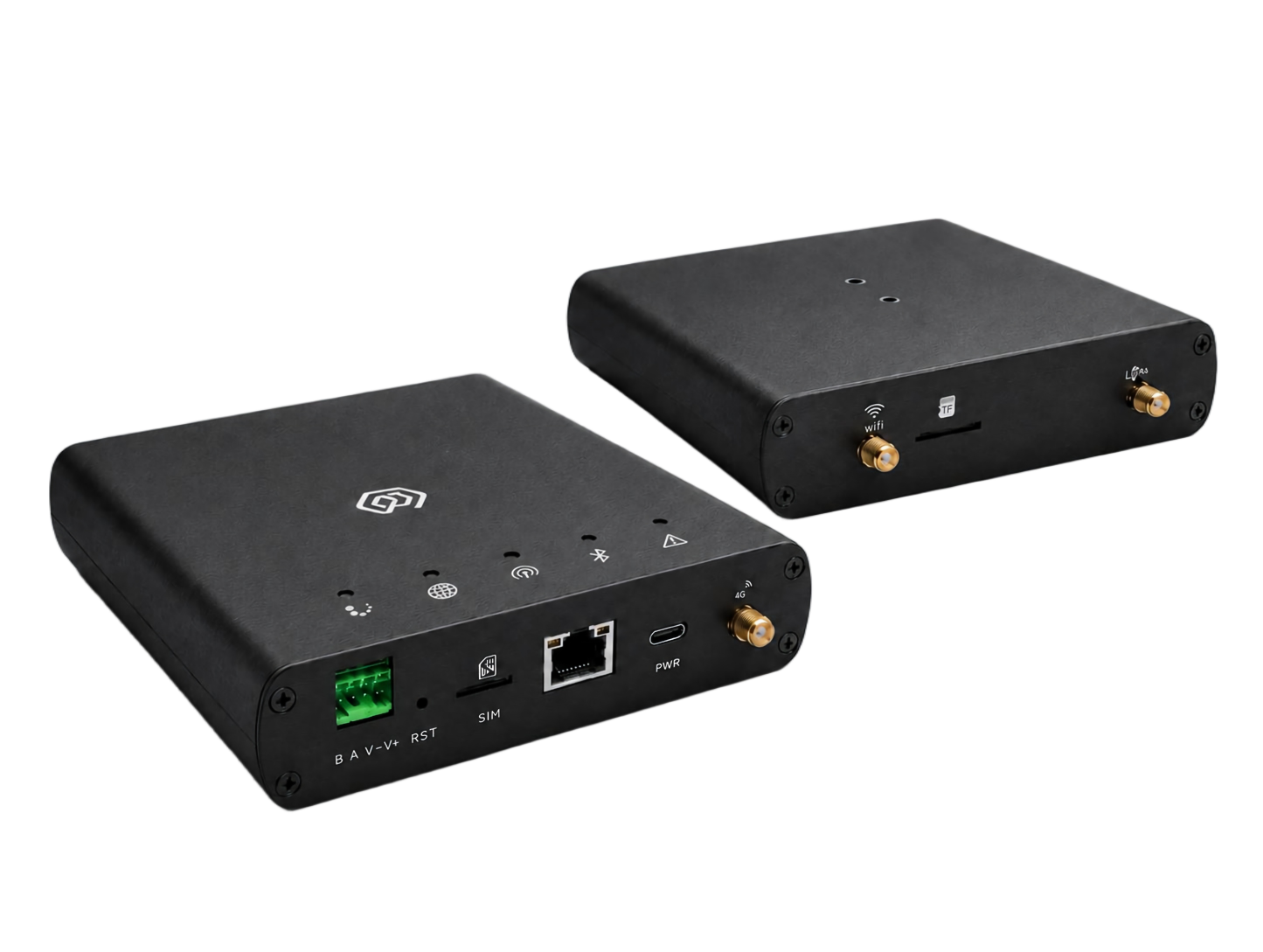
GD73 is an indoor, multi-channel, high-performance gateway designed by ManThink for LoRaWAN systems. It uses a high-performance processor, a Semtech SX1302 LoRa concentrator and an industrial-grade Wi-Fi module. It supports Ethernet, cellular, Wi-Fi access-point/client, Bluetooth Low Energy (BLE) and RS485 connections. The aluminum-alloy enclosure supports DIN-rail mounting and PoE, USB Type-C or DC 5–24 V power. GD73 is suitable for campuses, buildings, industrial sites, smart-property deployments and other indoor IoT environments.
3. Main Features
- High-performance chipset, at least 512 MB DDR and at least 16 GB eMMC
- Semtech SX1302 LoRa concentrator supporting Type A with 8 frequency points and Type D with 16 frequency points
- -141 dBm LoRa receiver sensitivity at SF12/BW 125 kHz; maximum transmit power is 27 dBm for suffix
-1and 22 dBm for suffix-2, with a maximum-power tolerance of ±2 dBm - Standard LoRaWAN and AS923 regional parameters, plus regional configurations for CN470, EU433, EU868, AU915 and US915
- Industrial-grade Wi-Fi module supporting access-point and client modes
- 2.4 GHz or 5 GHz Wi-Fi, IEEE 802.11a/b/g/n/ac/ax, at least 100 Mbps download and at least 50 Mbps upload
- Bluetooth Low Energy (BLE)
- RS485 interface for industrial meters, controllers and other field equipment
- Ethernet, 4G/LTE and Wi-Fi backhaul, plus dual-gateway redundancy architecture
- GPS and BeiDou (BDS) positioning, plus NTP clock synchronization
- MQTT, MQTTS, HTTP, HTTPS, SNMP, DHCP, static IP, NAT and ICMP
- WPA2, AES, TLS, firewall and access control list (ACL)
- Secure remote management, configuration and upgrades; supports Python and Node-RED for secondary development
- Automatic fault detection and recovery; monitoring of CPU, memory, storage, network and LoRa communication quality
- PoE, USB Type-C and DC 5–24 V power, with visual configuration and maintenance through gwTool7
4. Technical Specifications
| Category | Parameter | GD73 Specification |
|---|---|---|
| § Compute and storage | ||
| SoC | High-performance multi-core processor | |
| Memory | DDR, ≥ 512 MB | |
| Storage | eMMC, ≥ 16 GB | |
| § Software and platform | ||
| Built-in platform | Built-in TKL LoRaWAN network server and IoT platform | |
| External platforms/protocols | ThinkLink, ChirpStack, TTN, Basic Station and GWMP | |
| Data services | PostgreSQL, Redis, historical data storage, Thing Model, application data parsing and Dashboard | |
| Secondary development | Supports Python and Node-RED | |
| Remote operations | Remote management, configuration and upgrades over SSH | |
| Fault handling | Automatic fault detection and recovery | |
| Monitoring | Reporting of CPU, memory and storage usage, network status and LoRa communication quality | |
| § LoRaWAN | ||
| Concentrator | Semtech SX1302 | |
| Protocol | Standard LoRaWAN; compliant with LoRa Alliance™ LoRaWAN Specification v1.0.4 or a later version | |
| Operating bands | AS923: 920–928 MHz; regional configurations also include CN470, EU433, EU868, US915 (902–928 MHz) and AU915 | |
| Channels/frequency points | Type A: 8 frequency points; Type D: 16 frequency points at BW = 125 kHz | |
| Demodulators (Type A) | 16, processing up to 16 packets simultaneously | |
| Demodulator composition (Type A) | 8 × SF5–SF12 LoRa® demodulators; 8 × SF5–SF10 LoRa® demodulators | |
| Channel capacity (Type A) | 65 logical channels; each SF, bandwidth and frequency-point combination defines a channel | |
| Communication rate | 292 bps to 15.625 kbps | |
| Spreading factors | SF5 to SF12 | |
| Single-channel bandwidth | 125 kHz or higher | |
| Operating mode (Type A) | Half-duplex | |
| Transmit power | Suffix -1: 27 dBm maximum; suffix -2: 22 dBm maximum; maximum-power tolerance: ±2 dBm; projects requiring at least 25 dBm capability shall select suffix -1 | |
| Receiver sensitivity | -141 dBm at SF12/BW 125 kHz | |
| Antenna | Omnidirectional LoRa antenna | |
| § Wi-Fi and Bluetooth | ||
| Wi-Fi module | Industrial-grade Wi-Fi module | |
| Operating modes | Access-point mode and client mode | |
| Bands/standards | 2.4 GHz or 5 GHz; IEEE 802.11a/b/g/n/ac/ax | |
| Download/upload | Download ≥ 100 Mbps; upload ≥ 50 Mbps | |
| Security | WPA2, AES and TLS | |
| Bluetooth | Bluetooth Low Energy (BLE) | |
| § Network and transport | ||
| Ethernet | 1000M/100M; DHCP and static IP configuration | |
| Cellular uplink | CAT1 4G/LTE module by default; LTE-FDD B1/3/5/8 and LTE-TDD B34/38/39/40/41 | |
| Data forwarding | MQTT, MQTTS, HTTP and HTTPS | |
| Network services | NTP, prevailing-version SNMP, NAT and ICMP diagnostics | |
| Network redundancy | Dual-gateway architecture for network redundancy | |
| § Security and authentication | ||
| Device identity | IMEI or device-feature-string authentication | |
| Access protection | Firewall and access control list (ACL) | |
| Transport security | Prevailing-version TLS; administrators can disable unsafe SSH/TLS cipher suites | |
| § Ports and timing | ||
| Configuration ports | USB Type-C, Ethernet and Wi-Fi | |
| SIM slot | One external SIM slot supporting LTE/5G SIM cards; cellular standards are determined by the configured module | |
| Positioning/timing | GPS and BeiDou (BDS) positioning; NTP synchronization | |
| § RS485 | ||
| Physical interface | One RS485 interface on green A/B terminals | |
| Connection | Half-duplex differential bus for industrial meters, controllers and other field equipment | |
| Communication parameters | Baud rate, parity and application protocol are set in the device configuration or application | |
| § Power | ||
| PoE power | One PoE Ethernet port; nominal 48 V PoE | |
| USB power | USB Type-C, 5 V | |
| DC power | DC 5–24 V on green V−/V+ terminals | |
| Power consumption | ≤ 5 W in a typical configuration | |
| § Environment and enclosure | ||
| Operating temperature | -N: -20°C to 70°C; -I: -40°C to 70°C; -C: 0°C to 65°C | |
| Operating humidity | 0% to 95% RH, non-condensing | |
| Ingress protection | IP30 | |
| Radio-equipment requirement | Compliant with HKCA 1078 requirements | |
| Weight | 0.33 kg | |
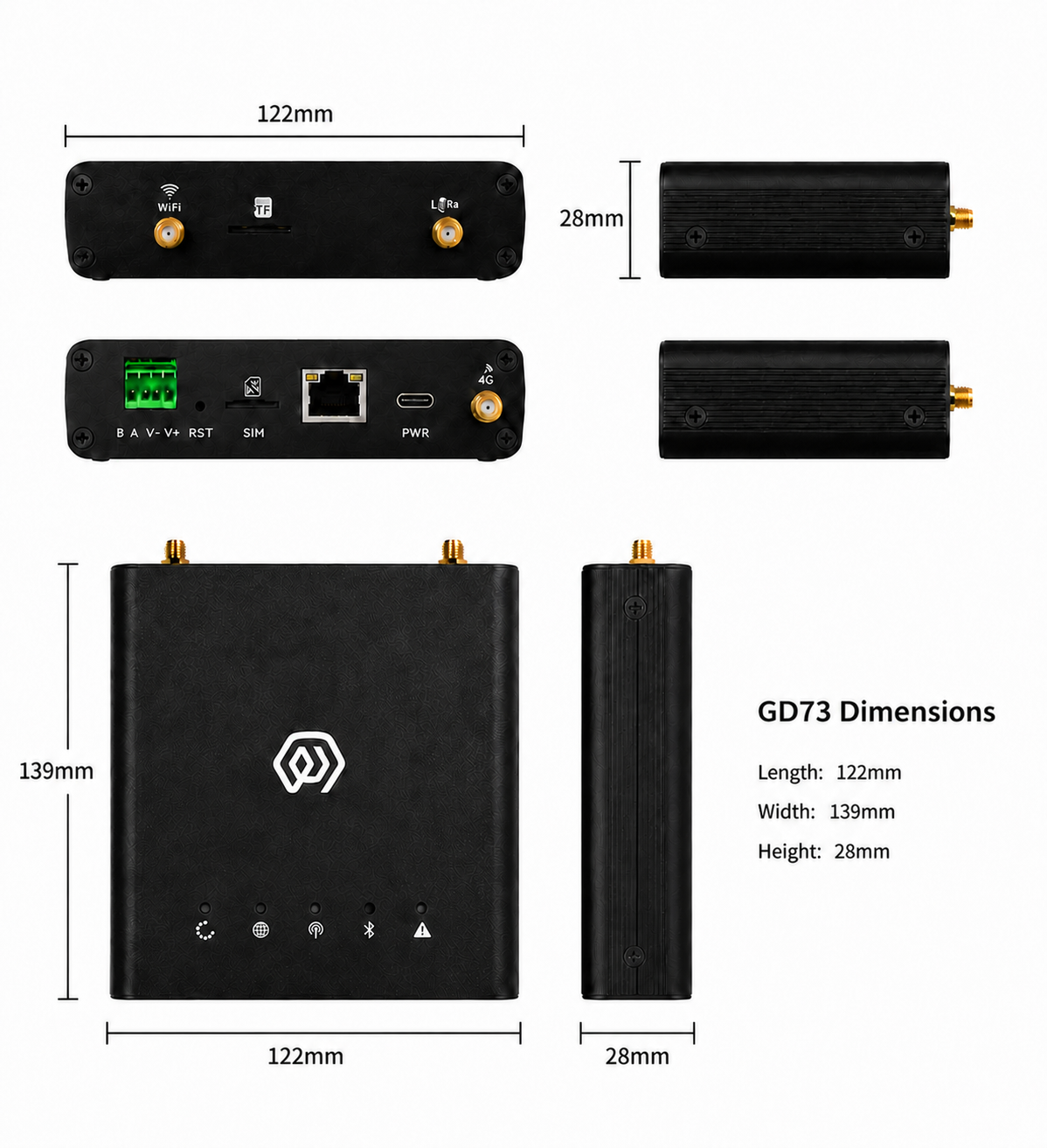
| Dimensions | 139 × 122 × 28 mm | |
| Installation | DIN-rail mounting |
Cellular deployment note: if local operator bands are outside the default module range, contact ManThink for a suitable cellular module. Configure actual LoRa transmit power to comply with local regulations.
5. Accessories
The product package includes the GD73 gateway, PoE power components, power adapter, Type-C cable, DIN-rail backplate, LoRa antenna, LTE antenna, positioning antenna, Wi-Fi antenna, network cable, green terminal block and mounting fasteners. Cellular-enabled versions include an LTE/5G SIM card with a data plan suitable for the project transmission requirements.
6. Product Dimensions
The product outline and installation dimensions are shown below.
7. Interface Description
| Interface | Description |
|---|---|
| WiFi | Wi-Fi antenna interface |
| TF | Memory-card slot |
| LoRa | LoRa antenna interface |
| B / A | RS485 differential-signal terminals |
| V− / V+ | DC 5–24 V power-input terminals |
| RST | Reset button |
| SIM | SIM-card slot |
| RJ45 | Ethernet and PoE power interface |
| PWR | USB Type-C power interface |
| 4G | LTE antenna interface |
8. Indicator Description
| Indicator | State | Description |
|---|---|---|
| Run indicator | Steady / off / 1 Hz flashing | System starting / base startup complete and applications starting / normal operation |
| Network indicator | 1 Hz / 500 ms / rapid flashing | Network normal / network abnormal / network configuration in progress |
| Cellular indicator | Off / steady / irregular flashing | No module / module installed without SIM / cellular data activity |
| LoRa transceiver indicator | TX-color / RX-color flashing | Transmitting / receiving LoRa packets |
| LAN status indicator | Red / blue | System-control state / Wi-Fi connection state |
| Fault indicator | Rapid flashing / off / flashing | Startup phase 2 / no fault / fault detected |
9. Product Model
9.1 Standard Model
The GD73 standard model is GD738-AG-AS923-N-2.
An example of a 16-frequency model with an integrated cellular module is GD738-DG-AS923-N-2. A identifies 8 frequency points, D identifies 16 frequency points, and G identifies an integrated cellular module.
The operating temperature range is selected independently of the frequency-point configuration. Select -C, -N or -I in place of the temperature-range segment -N according to the operating-temperature requirements; see Technical Specifications for the ranges.
9.2 Model Components
- GD738: series and RF band. GD73 identifies the indoor LoRaWAN gateway series; 8 identifies the 800 MHz-and-above RF version.
- -AG: LoRa architecture and cellular configuration. A identifies one LoRa antenna, 8 frequency points, 65 channels and half-duplex operation; G identifies an integrated cellular module.
- -DG: LoRa architecture and cellular configuration. D identifies 16 frequency points; G identifies an integrated cellular module.
- -AS923: LoRaWAN regional standard. Identifies support for AS923 regional parameters.
- -N: Operating temperature is -20°C to 70°C.
- -I: Operating temperature is -40°C to 70°C.
- -C: Operating temperature is 0°C to 65°C.
- -1: transmit-power version. Maximum transmit power is 27 dBm, with a maximum-power tolerance of ±2 dBm.
- -2: transmit-power version. Maximum transmit power is 22 dBm, with a maximum-power tolerance of ±2 dBm.
10. Gateway Installation
Do not open the gateway enclosure during installation. Disconnect power first and verify that antennas, PoE, DC power and site cabling meet deployment requirements.
11. Accessory Connections
11.1 Antenna Connection
- Connect the LoRa, LTE, positioning and Wi-Fi antennas to their matching interfaces.
- Tighten antenna connectors evenly without overtightening.
11.2 Type-C Power Connection
- The Type-C power cable is not required when PoE or DC power is used.
- For USB power, connect the Type-C cable to the gateway PWR interface.
11.3 Network Cable Connection
- Connect the network cable to the gateway RJ45 interface.
- When using PoE, connect the other end to compliant PoE equipment.
11.4 SIM Card Installation
- Before using cellular networking, insert a SIM card into the gateway SIM slot.
- Follow the slot marking for contact and notch orientation; do not force the card.
11.5 RS485 Connection
- With power disconnected, connect the field-device RS485 A and B wires to the matching green A and B terminals.
- Verify bus polarity, termination and common-reference requirements against the field-device manual.
- After power-up, configure matching baud rate, data bits, stop bits, parity and application protocol in the application or device configuration.
11.6 DC 5–24 V Power Connection
- With power disconnected, connect the supply negative and positive wires to the green V− and V+ terminals.
- Verify the voltage range and polarity before applying power.
12. Gateway Mounting
12.1 DIN-Rail Mounting
- Fasten the DIN-rail backplate to the rear of the gateway.
- Engage the backplate with the matching DIN rail and verify that the gateway is secure.
13. Gateway Configuration
GD73 is configured and maintained with gwTool7. See the gwTool7 Gateway Administrator Manual.
14. RS485 Use
The RS485 interface connects field meters, sensors or controllers. After wiring and power-up, configure serial parameters and the application protocol in the GD73 application or protocol-conversion program to match the slave device. For long buses, follow the site topology when configuring termination, biasing, shielding and grounding, and avoid star branches that can cause signal reflections.
15. Platform Connections
- ThinkLink: ThinkLink User Guide
- ChirpStack: Connect with Basic Station (gwTool7)
- TTN: Connect with Basic Station (gwTool7)
16. Security Configuration Recommendations
- Change default administrative credentials during initial deployment, restrict management access to trusted networks, enable the firewall or ACL, and disable unnecessary services and ports.
- Use a prevailing TLS version and disable unsafe SSH/TLS cipher suites; retain audit records for remote upgrades, configuration changes and administrator operations, and regularly review CPU, memory, storage, network and LoRa communication-quality alarms.
17. Contact Us
Website: www.manthink.cn · Email: info@manthink.cn · Tel: +86 15810684257