MC11 38K Infrared Data Logger specificationV1.0
1. Product Introduction
2. Product Description
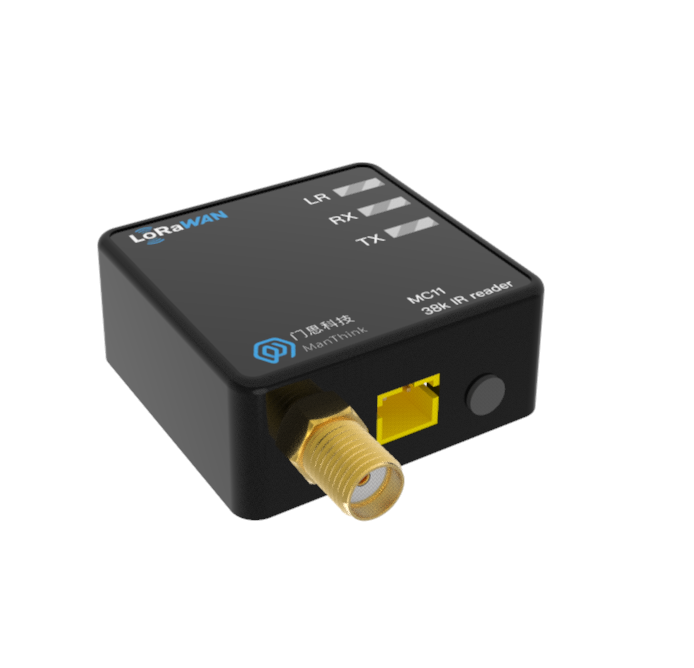
MC11 is a high-performance, low-power infrared communication acquisition terminal independently developed by ManThink. The product integrates 38kHz infrared signal transceiver module, high-performance MCU and LoRa ® RF chip, flexible configuration, designed for all kinds of equipment with 38kHz infrared interface to achieve data acquisition and remote control.
Based on advanced LoRa ® Wireless technology, MC11 support standard LoRaWAN ® Protocol, with ultra-long communication distance and ultra-low power consumption, suitable for wide-area IoT deployment. The equipment adopts adhesive mounting design, equipped with 3V battery interface and external AA battery box (supporting 2 AA batteries), which is convenient to install and has long endurance.
MC11 compatible with mainstream LoRaWAN ® Gateways and IoT platforms (such as ThinkLink, ChirpStack, and The Things Network) can seamlessly connect to existing IoT systems to achieve efficient cloud migration and centralized data management.
The built-in EB virtual machine supports compiling EB scripts and remotely updating device functions through FUOTA (Firmware Over-the-air upgrade). With the help of EB virtual machine, users can quickly adapt to the infrared communication protocols of different manufacturers, and realize complex business logic such as data filtering, COV (change reporting), alarm triggering, data reorganization, etc. on the terminal side, which greatly improves the flexibility and intelligence level of the system.
3. Application Areas
- Industrial Site
- Electric Meter Reading
- Heat Meter Reading
4. Main Features
- 38kHz infrared carrier communication
- External battery power supply, XH2.0 battery interface, easy to replace.
- 2 × AA battery life up to 2 years (30 minutes acquisition cycle)
- Support modbus,DL-T645 and other protocol standards (through remote upgrade, can be flexibly adapted to any protocol)
- Static power consumption <4uA, meter reading current<6mA
- Support key trigger meter reading, upload data, easy to verify the installation effect during installation
- Support FUOTA upgrade, can upgrade the built-in meter reading protocol through the platform downlink
- Support for EB virtual machines
- Support remote upgrade via LoRaWAN communication
- Support ThinkLink/ChirpStack/TTN platform docking
- Support US902,AU915,AS923,EU868,EU433,CN470 LoRaWAN standards
5. Parameters
| Item | Value |
|---|---|
| § Interface | |
| Power Interface | XH2.0 |
| Antenna Interface | SMA |
| Button | 1 |
| Indicator Light | LR :LoRa transceiver |
| RX: Infrared receiver | |
| TX: Infrared transmission | |
| § Wireless parameters | |
| Protocol | standard LoRaWAN |
| Regional Standards | CN470/EU433/EU868/AS923/AU915/Us902 |
| Transmit power | maximum 22dBm ( can be changed) |
| Receiving sensitivity | -142dBm(SF=12,BW=125kHz) |
| Working mode | OTAA/ABP Class A |
| § Configuration | |
| Test /Trigger mode | press the button, 2 seconds to trigger heartbeat data 6 seconds to trigger the network |
| Configuration | by NS issue instruction |
| § Physical characteristics | |
| Power Supply Mode | 2 AA batteries |
| Receiving Current | < 8mA |
| Reading Current | < 6mA |
| Emission current | < 110mA (22dBm transmit power) |
| Working Temperature | -40°C ~85°C |
| Relative humidity | ≤95% (no condensation) |
| Protection level | IP53 |
| Material & Color | ABS + PC, Black |
| Dimensions | 32mm x 31mm x 19mm |
| Installation method | adhesive paste |
6. Dimensions And Interfaces
6.1 Dimensions
32mm x 31mm x 19mm
6.2 Interface Definition
| Name | Definition |
|---|---|
| antenna Interface | SMA outer screw inner hole |
| power Interface | XH2.0 |
| Button | Press the button, 2 seconds to trigger heartbeat data 6 seconds to trigger the network |
| LR indicator light | Data status indicator when LoRa data transmission and reception, flashing 100ms |
| RX indicator | Data reception indicator, received infrared data flashes |
| TX indicator | Data transmission indicator, flashing when sending infrared data |
7. Product Model
7.1 Model example
MC118-A1-AS923-N
7.2 Model component breakdown
MC118: product series and RF band.MC11identifies a first-generation 38 kHz carrier infrared meter reader.8identifies the 800 MHz-and-above RF version for EU868, AS923, AU915 and US902.- Other band option:
4identifies the 400 MHz RF version for EU433 and CN470.
-A1: hardware and power configuration.Aidentifies the default hardware configuration.1identifies a 2.2–3.6 V battery input using an XH2.0 connector.
-AS923: LoRaWAN regional standard.AS923means that the device supports the LoRaWAN AS923 regional parameters.- Other regional codes are
CN470,EU433,EU868,AU915andUS902;US902denotes the LoRaWAN US915 (902–928 MHz) regional parameters.
-N: default version.Nidentifies the default version.- Other values are reserved for customized or special versions.
7.3 Complete model meaning
The complete meaning of MC118-A1-AS923-N is:
This is a first-generation 38 kHz carrier infrared meter reader in the 800 MHz-and-above RF class. It uses the default hardware configuration, provides an XH2.0 connector for a 2.2–3.6 V battery, supports the LoRaWAN AS923 regional standard, and uses the default final version code N.
8. Network Topology
MC11 is standard LoRaWAN ® Terminal equipment, its normal operation depends on the complete LoRaWAN network environment. You can use ManThink or a third-party LoRaWAN gateway to build Network coverage, and configure a LoRaWAN Network Server (NS) to enable device access and data forwarding. MC11 is compatible with mainstream standard LoRaWAN Network platforms, including ThinkLink, ChirpStack, and The Things Network (TTN).
At the application layer, you can use the ThinkLink platform to define a thing model, implement data parsing, business function configuration, card view display, and custom business logic processing, and quickly complete device-to-application integration.
A typical LoRaWAN network topology is as follows:

9. Working Mode
9.1 EB Configure Collection and Upload Tasks
MC11 has built-in EB virtual machine, which can implement various business logic of meter reading by calling SDK and TS code. EB instructions for use:
\AN-25100101 EB compiler SDK instructions
9.2 Communication Test
Short press the button to trigger a packet of upstream measurement data
9.3 Network Access
Long press the button 6s-8s, you can trigger a packet of network data.
10. Installation Instructions
- [x] Use adhesive to install, align the transparent window with the infrared transceiver of the meter and other equipment, and paste the adhesive on the meter shell.
- [x] After installing 2 AA batteries, plug the XH2.0 connector of the battery box into the battery interface of mc11.
- [x] Turn the switch ON the battery box to ON
11. Standard
The format of the communication protocol is customized through EB Compilation. We recommend that you use the protocol format standard recommended by ManThink.
\PTL-D01 ManThink Technology IoT Terminal Application Layer General Protocol V1.5
12. Parameter Modification
Refer to Chapter 5 of PTL-D01-Internet of Things Terminal Application Layer General Protocol V1.3 for parameter modification. Parameter modification is delivered through Port 214.
\PTL-D01 ManThink Technology IoT Terminal Application Layer General Protocol V1.5
12.1 Configuration Parameter Address Table
\AN-25100106 EdgeBus App Parameter Manual .
13. ThinkLink Thing Model
Log in to https://thinklink.manthink.cn
13.1 Device Template
Battery powered KC21 should use the template of MT-EB-BATTERY and DC powered KC21 should use the template of MT-EB-POWER . he models already mounted as follows:
- Thing Model: MT-EB
- RPC:
[MT ACT] action: Used to execute operations such as reset, join, redo, and reading parameters
[MT ACT] transparent: Transparent RPC; hexadecimal data can be sent via port 51, which will be forwarded to sub-devices through the RS485 interface, and responses from the sub-device will be returned
[MT SET] app para: Set EB parameters
[MT ACT] debug modbus: Online Modbus debugging by entering information such as 485 address and Modbus function code
ALARM: Used for alarm functionality; trigger rules must be configured to enable full alarm features
14. Contact Us
Website: www.manthink.cn
Email: info @ manthink.cn
Tel: +86-15810684257