Forwarder
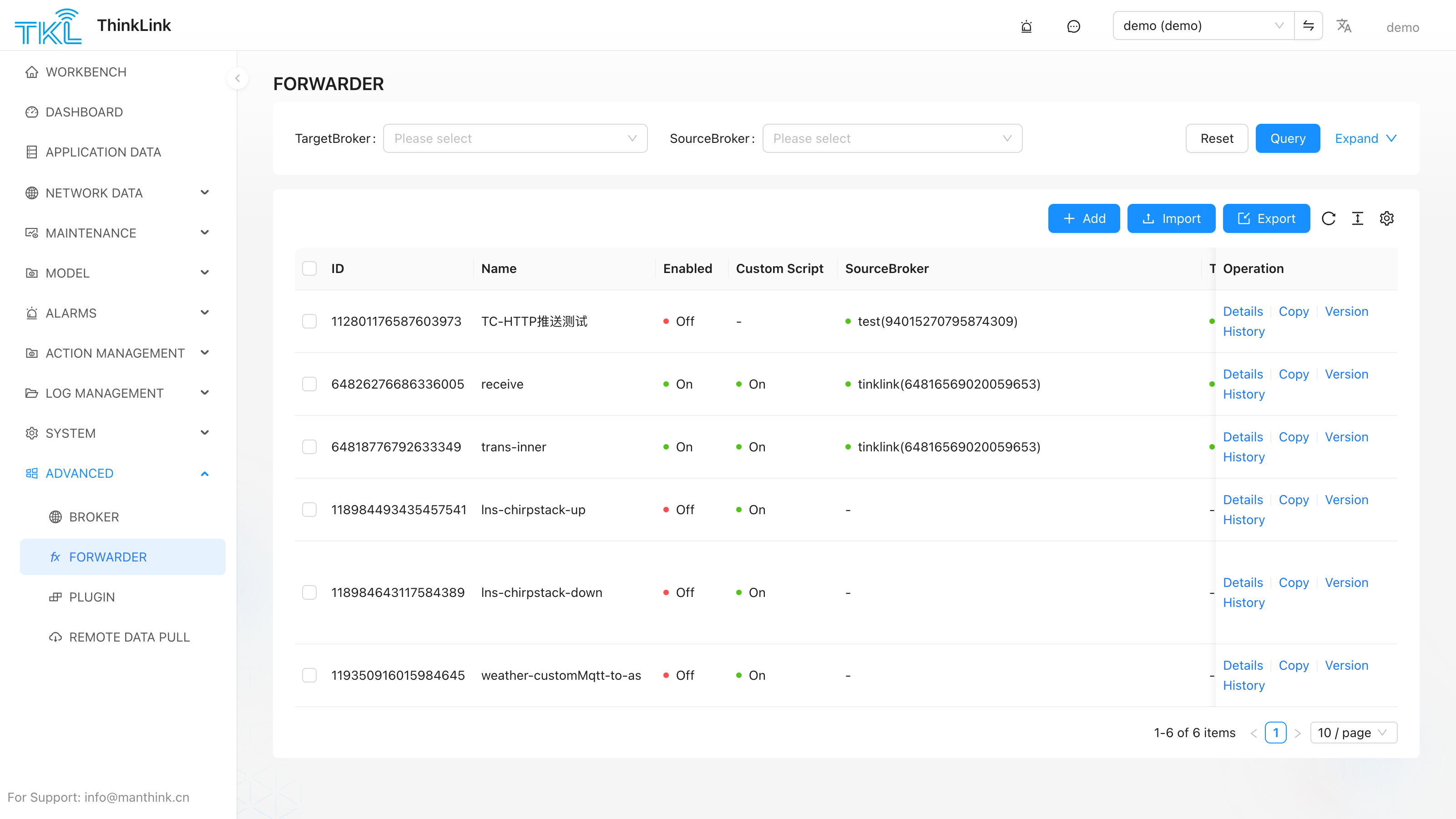
Advanced → Forwarder defines message-routing rules that bridge MQTT topics between two brokers. Each rule subscribes to a topic on a Source Broker and republishes every message it receives to a Target Broker.
How It Works
Source Broker ──(subscribe topic)──▶ Forwarder Rule ──(publish)──▶ Target BrokerA forwarder rule does not transform the message by default — it forwards the payload as-is. Optionally enable Custom Script to apply a JavaScript transformation before the message is republished.
Column Reference
| Column | Meaning |
|---|---|
| ID | Forwarder record ID |
| Name | Rule name, e.g. receive, trans-inner |
| Enabled | Green On = rule is active and forwarding; grey = suspended |
| Custom Script | Green On = a transformation script is applied before republishing |
| SourceBroker | The broker this rule subscribes to (topic source) |
| TargetBroker | The broker this rule publishes to (message destination) |
| Operation | Details — view and edit the rule |
Configuration Fields (Add / Edit Dialog)
| Field | Description |
|---|---|
| Name | Label for this forwarding rule |
| Enabled | Toggle to activate or suspend without deleting |
| Source Broker | Select from brokers defined in Broker |
| Target Broker | Select from brokers defined in Broker |
| Subscription Topic | The MQTT topic pattern to subscribe to on the Source Broker (supports + and # wildcards) |
| Custom Script | Enable to write a JS script that transforms the payload before it is published to the Target Broker |
| Notes | Free-text remarks |
Typical Use Cases
- Internal bridging — forward device uplinks from the AS broker to an internal service broker for further processing (
trans-inner) - External push — forward selected topics to a customer's own MQTT broker or cloud platform
- Protocol translation — enable Custom Script to reformat payloads (e.g. rename fields, convert units) before republishing
Related Pages
- Defining broker connections → Broker
- Built-in MQTT forwarding to external brokers → MQTT Forwarder
System Platform Forwarders
The System Platform can create public forwarder configurations. Public configurations are visible to all organizations. Tenant-side users can view them but cannot edit them. If a system admin creates a forwarder for a specific organization, that forwarder runs with that organization's brokers and organization parameters.
When the organization is empty or PUBLIC, Source Broker and Target Broker are cleared and the record is saved as public configuration. Select a specific organization before choosing its brokers.
Subscription Topic Placeholders
Subscription Topic supports organization-parameter placeholders. ThinkLink reads values from params.org_params and renders the actual subscribed topic. Example:
/${tenant}/device/${project}/upAfter saving, the forwarder cache stores the rendered topic and subscribes with that topic.
Custom Script Arguments
The custom script entry point is:
function forwardScript({ topic, msg, org_params }) {
  return msg
}
org_params is read-only and is intended for tenant-level dynamic parameters in forwarding logic.
Version Restore
Each forwarder save creates a version snapshot. Fill in a commit note before editing so later versions can be reviewed or restored.