Core Capability · ThinkLink Micro-Apps

One stable authority. Spaces that evaluate, converse, and adapt without code.

Driven directly by ThinkLink's authoritative data models and shared runtime, Micro-Apps pair a 3D spatial Cockpit with a high-density CardList workbench—bringing real-time condition scoring, alarm priority, governed AI Page APIs, and WYSIWYG customization.

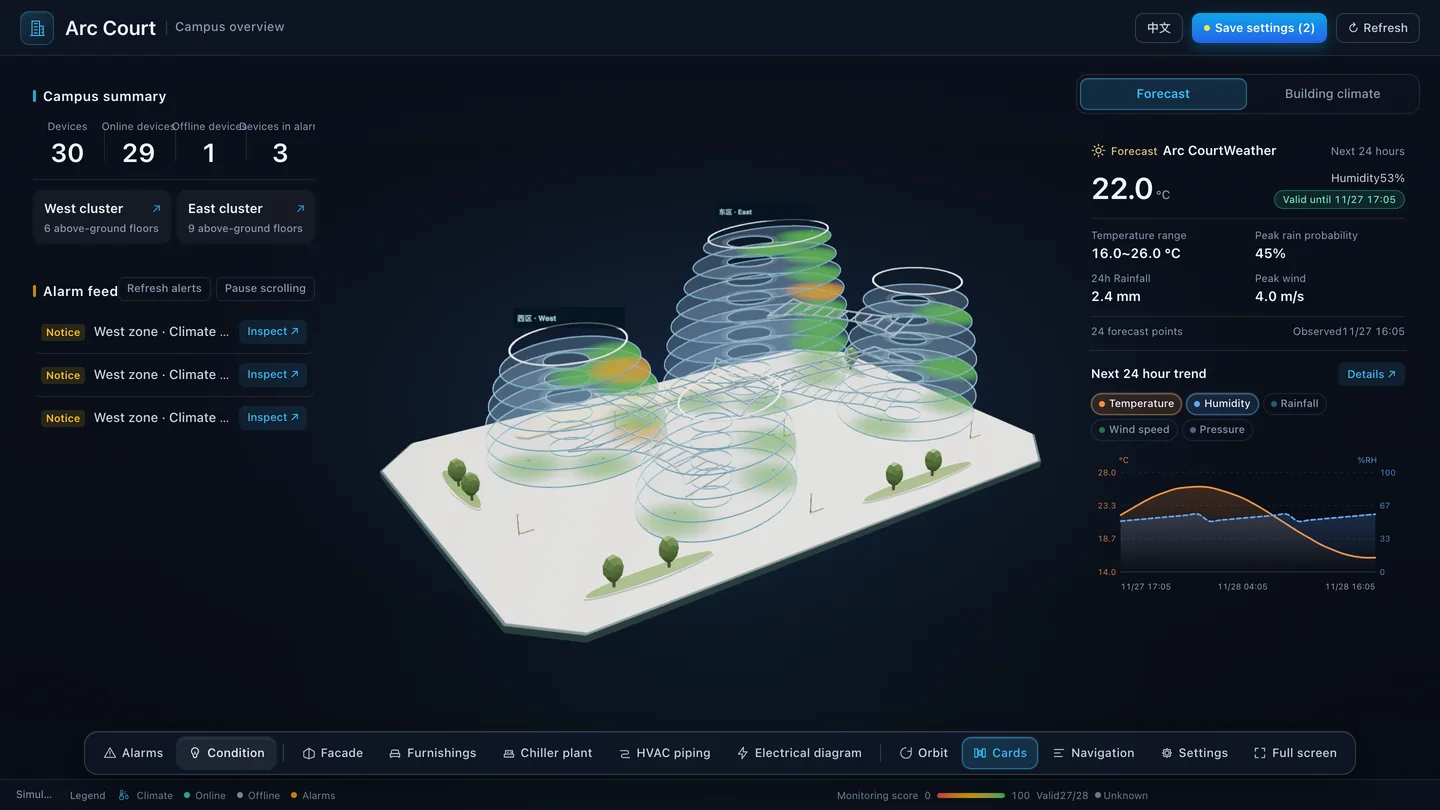
Arc Court 3D Cockpit micro-app showing translucent procedural towers, radial floor condition fields, live alarm feed, and 24-hour weather forecast
Live Micro-App Demo · 3D Cockpit radial condition field and alarm stream
1 Authority Cockpit, CardList, and Mobile share identical data and permissions
0–100 Dual Score Monitoring & device health scoring with 4-tier alarm override
7 Semantic Themes WYSIWYG live preview, explicit save, zero overwrite on upgrades
Single-Submit RPC Retries managed by platform; separates ACK from field telemetry
LIVE INTERACTIVE DEMOS · OPERATE DIRECTLY ON THIS PAGE

Two real micro-apps you can operate right here—no login required

Explore two self-contained production-style demos directly in the interactive stage below. Switch between the 3D Cockpit to orbit procedural towers, inspect radial condition fields and MEP overlays, and the CardList workbench to test 5-grade health coloring, 24-hour profiles, and the 7-theme WYSIWYG studio.

Sandboxed · Self-contained sample data · No account needed Open in New Tab
COCKPIT · 3D BMS

Arc Court · 3D Building Operations Cockpit

Lightweight procedural 3D campus with facade transparency, floor radial condition fields, HVAC and electrical topology overlays, alarm jump-to-floor, and instant bilingual switch.

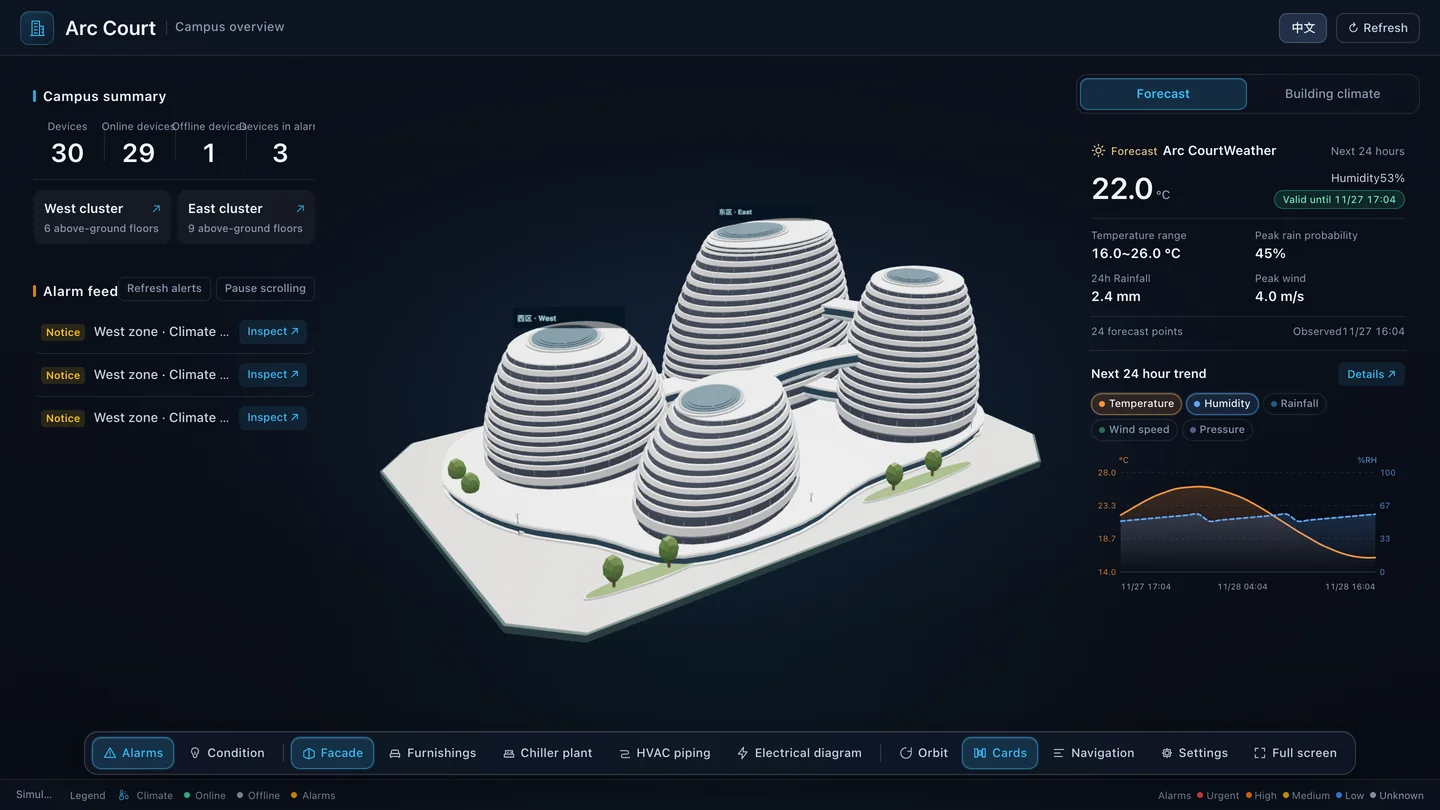
Arc Court 3D Building Cockpit interactive demo preview

Click Launch to load the full live micro-app directly inside this stage. Initial page load renders a lightweight preview so the site opens instantly.

Suggested interactions
  • Drag to orbit and scroll to zoom the procedural 3D building complex
  • Click Condition on the bottom dock to reveal translucent floor radial fields
  • Select West or East cluster to drill down into individual floor overviews
  • Toggle HVAC piping, Electrical diagram, Chiller plant, and EN/ZH language
CORE ARCHITECTURE · SIX DEFINING CAPABILITIES

Not a stitched-together dashboard, but a long-lived industrial micro-app system

Anchored on a stable foundation, runtime evaluation, and AI-driven workflows—proven across commercial building BMS and industrial campus operations.

01 Stable Foundation

Single authoritative core and governed runtime

Identity, permissions, thing models, aggregates, and command retries stay in ThinkLink. Micro-apps remain pure, deterministic views.

  • Cockpit, CardList, and Mobile consume identical live data, alarms, and RBAC
  • Shared UI components and procedural 3D assets are version-pinned with integrity verification
  • Single-submit control delegates retries to the platform; idle 3D scenes automatically pause rendering
02 Runtime Evaluation

Condition score tinting × real-time alarm priority

Turn raw sensor readings into instant spatial health signals—while offline, stale, or faulty probes stay isolated in gray and never fake green.

  • Platform outputs dual 0–100 monitoring and device health scores from live telemetry timestamps (30-min window)
  • 3D radial fields map score to hue and distance to density, blending smoothly across neighboring sensors
  • 5-grade list coloring with alarm-first guardrails: 4-tier live alarms always override condition tint
03 AI-Driven

Build-time Skills + runtime governed Page APIs

Extending ThinkLink's JavaScript AI-friendly low-code core from initial generation to safe, auditable runtime interaction.

  • AI Agents follow a structured six-stage Skill contract to build and refine micro-apps cleanly
  • Structured allowlisted Page APIs expose navigation, filters, coloring, charts, and 3D camera views
  • Reads run directly; writes enforce preview → human confirmation → verified execution with readback
04 Dual-Mode Parity

One asset semantic, two operational perspectives

Use Cockpit to locate spatial anomalies at a glance and CardList for device-by-device inspection, tuning, and authoritative reports.

  • Cockpit drills from campus to building to business space with facade perspective and MEP topology
  • CardList unifies Cards, dynamic List, and 24-hour profile matrix with location and network trees
  • Device detail workbench, space aggregate card, pop-over selectors, and 4D logs share 100% UI parity
05 WYSIWYG Studio

Zero-code light customization for every team

Adapt themes, typography, column widths, HUD opacity, condition palettes, and five chart types with instant preview and explicit save.

  • 7 semantic dark and light themes propagate end-to-end with verified readability
  • Four-layer config inheritance: Default → Global shared → Category/Model → Personal override
  • Preview live without silent writes; explicit save persists incremental settings to the server and survives upgrades
06 Closed-Loop Ops

Verified control feedback and 4D audit trails

Maintain full traceability from telemetry and threshold edits to verified hardware state, plus no-code device onboarding.

  • Explicitly distinguishes platform acceptance, write ACK, and independent hardware register readback
  • Unified 4D logs cover Maintenance, Alarms, Operator Actions, and Execution records
  • Built-in device onboarding maps thing models with live preview; probe faults hide invalid readings
ONE SEMANTIC · TWO VIEWS

Dual-mode unity: 3D Cockpit × CardList Workbench

Built for both control-room leads and field engineers, both views run on the exact same ThinkLink asset hierarchy and real-time subscription pipeline.

COCKPIT · 3D SPATIAL OPERATIONS

Drill from campus overview to floor spaces and MEP topology

Lightweight procedural 3D modeling eliminates bloated external model downloads, pauses rendering when idle, and reclaims graphics memory across scene switches for 24/7 display reliability.

  • Independent toggles for facade transparency, floor drill-down, HVAC piping, and electrical topology
  • Continuous 0%–100% floating HUD opacity keeps the 3D workspace unobstructed
  • Strict spatial coloring boundary stops at the business space so alarms pinpoint floors without painting whole towers red
Open Cockpit in Live Stage
Arc Court 3D Cockpit overview in English with procedural towers, alarm feed, and 24-hour forecast
Cockpit · Campus overview with procedural facades, floating HUD, and weather forecast
CARDLIST · HIGH-DENSITY INSPECTION

Switch seamlessly across Cards, List, and 24-hour profiles

Engineered for rapid fault triage, parameter editing, and authoritative reporting. Switching views reuses the active snapshot and exact-EUI MQTT deltas without polling storms.

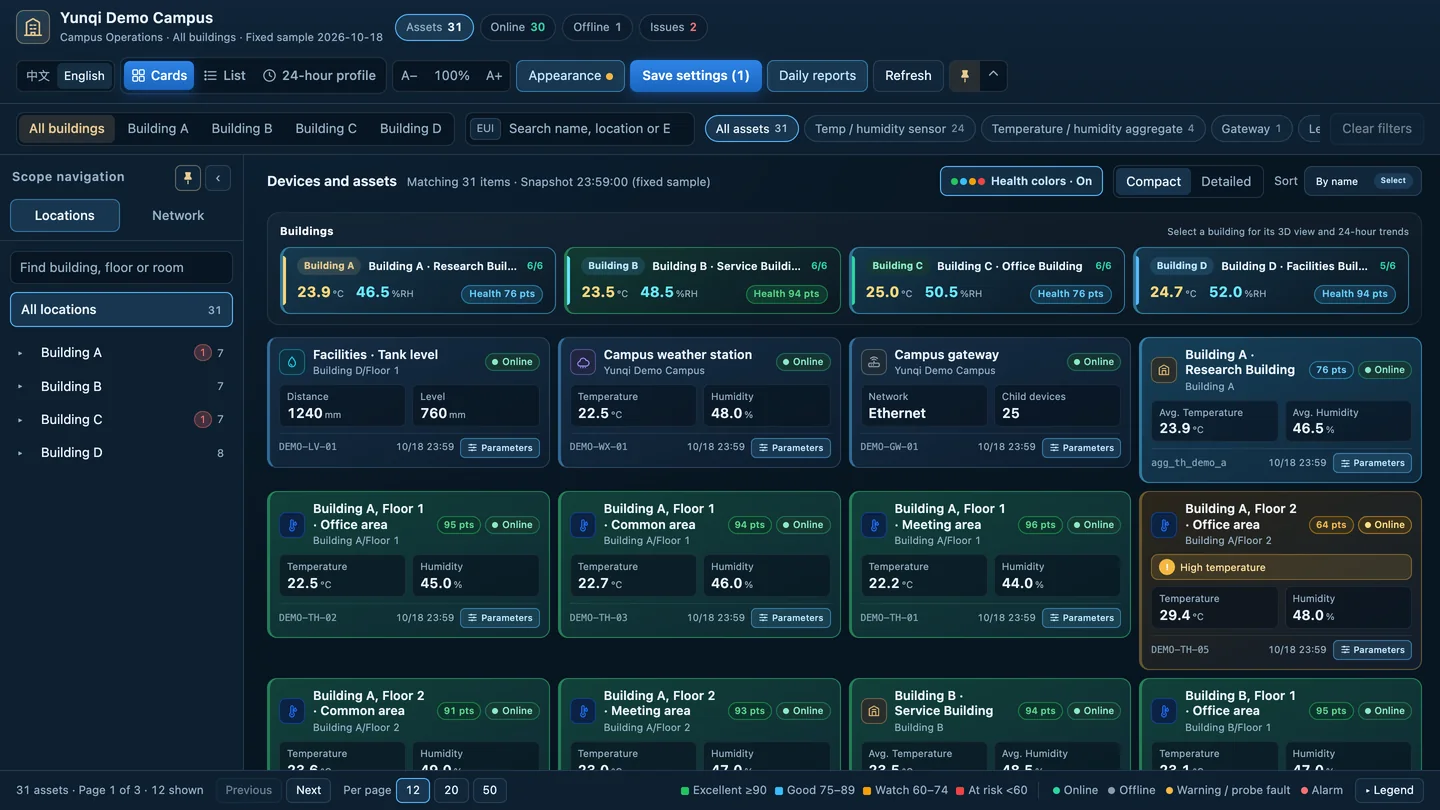
  • One-click 5-grade condition tinting adapts cleanly across all dark and light themes
  • 24-hour profile matrix reveals hourly health across 00–23h with direct platform PDF / Excel export
  • High-frequency thresholds and reporting intervals edit in one click; low-level commands stay tucked in advanced dialogs
Open CardList in Live Stage
Yunqi Demo Campus CardList workbench in English with 5-grade health coloring and location tree
CardList · Five-zone inspection workbench with 5-grade health tinting

Design invariant: 100% consistent detail dialogs across Cockpit and CardList

Whether operators click a 3D sensor anchor or a list row, they get the exact same detail workbench, layout behavior, and audit semantics.

Unified Device Detail WorkbenchUnified Space Aggregate CardUnified Pop-Over Config SelectorsUnified 4D Logs (Ops / Alarms / Actions / Execution)
WYSIWYG STUDIO · ZERO-CODE CUSTOMIZATION

7 semantic light & dark themes, live preview, explicit server persistence

Control rooms, bright offices, and individual engineers all have different visual preferences. The built-in Appearance studio lets teams tune themes, card fields, charts, and layout live without touching code.

Four-layer configuration inheritance
  1. 01 · Built-in baseline
  2. 02 · Global shared
  3. 03 · Category / Model override
  4. 04 · Personal override
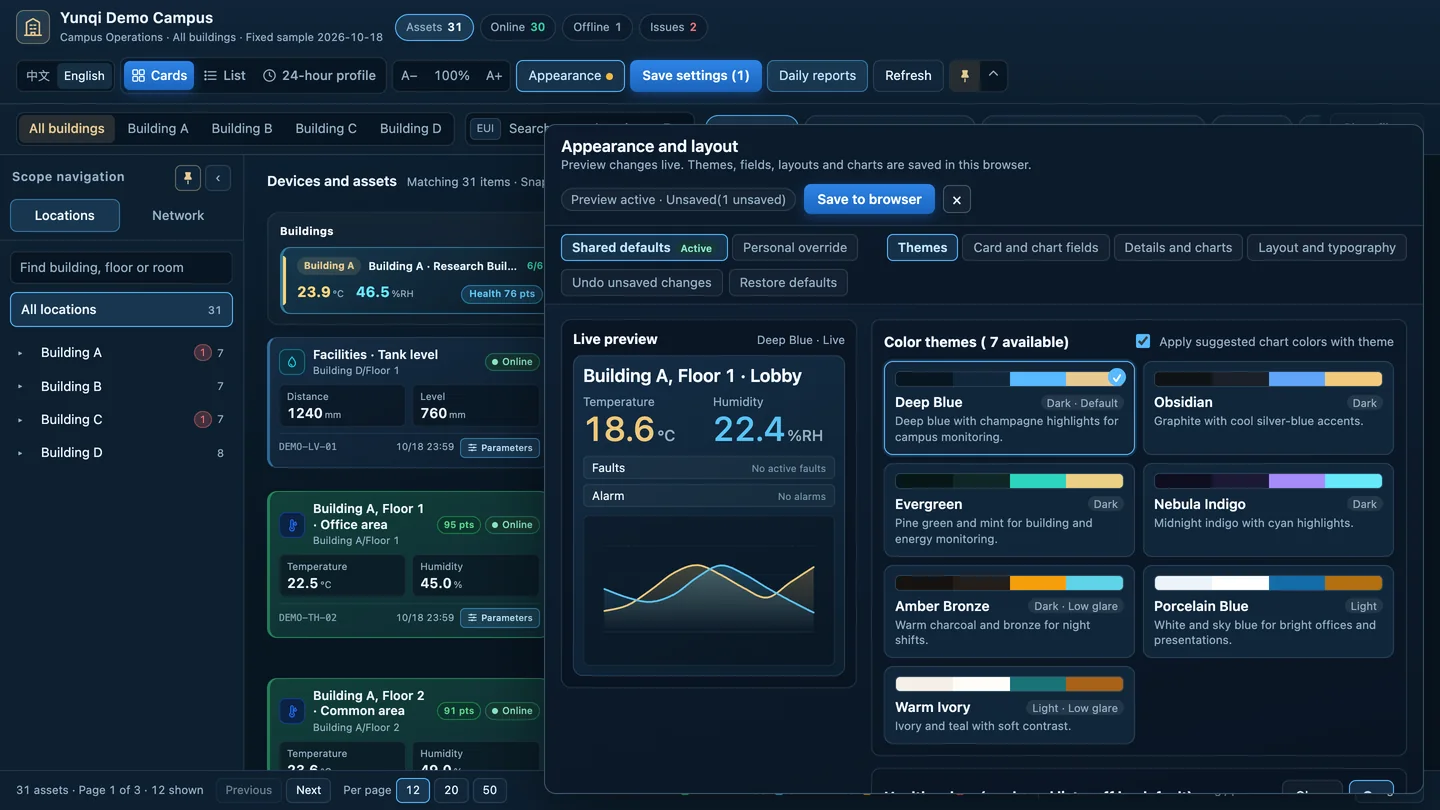
  • Deep Blue, Obsidian, Evergreen, Nebula Indigo, Amber Bronze, Porcelain Blue, and Warm Ivory themes propagate cleanly across shells, cards, and charts
  • Adjusting themes, column widths, 5 trend chart styles, or HUD transparency previews live with zero silent backend writes
  • Explicit save writes incremental settings to ThinkLink cloud storage with readback verification and survives version upgrades
Yunqi Demo Campus Appearance and layout customization studio showing 7 semantic themes and live preview card
Live Micro-App UI · WYSIWYG Appearance studio with 7 semantic themes and instant preview
PRODUCTION PATTERNS · PROVEN ACROSS INDUSTRIES

Field-proven across commercial buildings and industrial campuses

The same micro-app foundation powers multi-tower commercial BMS deployments and multi-warehouse industrial climate control with zero architectural forks.

Commercial Building BMS

Multi-tower 3D building cockpit and floor climate operations

Built for multi-building offices, basement chiller plants, and dense floor telemetry—unifying 3D spatial triage with 24-hour health profiles.

Lightweight 3D No heavy model downloads
MEP Overlay Electrical & HVAC per floor
24h Matrix Hourly profiles & PDF reports
  • Facade transparency, interactive floor drawers, and rich floor cards pinpoint anomalies in seconds
  • Dual monitoring/device condition scores drive radial floor fields while masking faulty probe values
  • One-click parameter updates for thresholds and intervals alongside direct platform daily reports
Explore BMS Solution
Industrial Park & Storage

Seven-layer 3D campus and closed-loop climate control

Combines EdgeBus collectors, RS-485 industrial dehumidifiers, wireless sensors, and weather stations for reliable automated control.

7-Layer 3D Toggleable site & interior layers
Single RPC ACK vs. register readback split
Page API Governed AI actions & no-code setup
  • On-demand loading of 7 campus layers and see-through telemetry bubbles with cross-session asset caching
  • Dual network-collector and warehouse-zone views isolate read-only sensors and export run-time Excel reports
  • Allowlisted Page APIs and no-code device onboarding let new sensor models go live without redeployment
Explore EdgeBus Integration

Turn IoT telemetry into living, self-evaluating micro-apps

Build custom Cockpit and CardList micro-apps on ThinkLink Cloud or self-hosted deployments using unified models and domain Skills.

Leave us a message

Share a partnership idea, a project need, or anything you would like us to know.

Leave your email if you would like us to contact you.

Your message will be stored for our team to handle this inquiry. Email is optional. Please do not include passwords or sensitive information.

Or email us directly at info@manthink.cn